How to use AI glasses as a teleprompter
If you have the right type of smart glasses, this is an easy feature to enable.
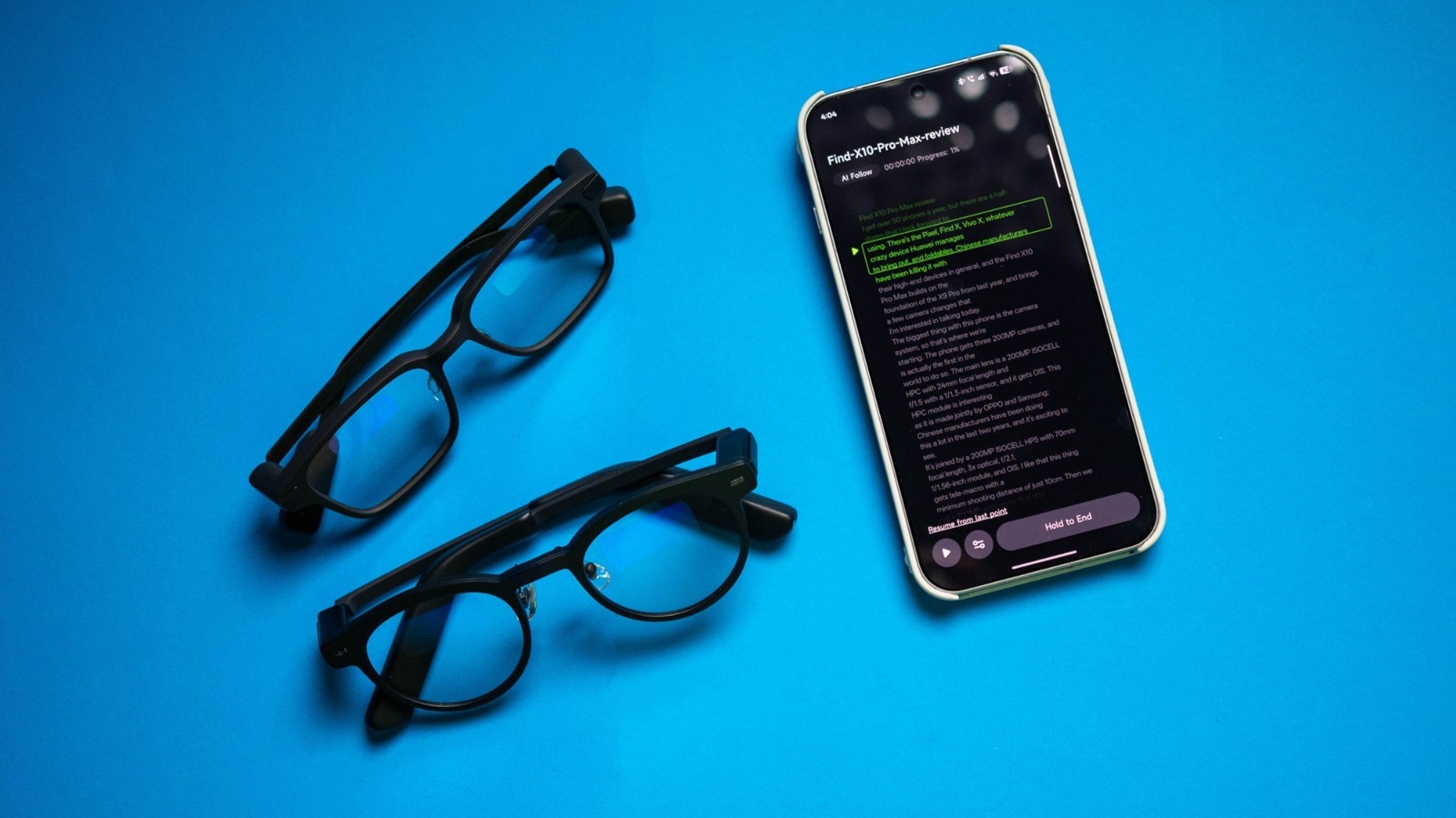
If you own a pair of smart glasses equipped with waveguides, enabling this feature is a breeze. Among the multitude of smart glasses available today, the XGIMI MemoMind One and Even Realities G2 stand out due to their built-in waveguides. These glasses offer the most utility when projecting screens for notifications, directions, or real-time translations outdoors.
What sets the MemoMind One and G2 apart is that they lack cameras, eliminating any social stigma when used outdoors. They also come with a teleprompter mode that allows you to deliver presentations or speeches while maintaining eye contact, making them quite capable in this regard. During my tests, I found the teleprompter mode on both the MemoMind One and G2 to be user-friendly.
To utilize this mode, you simply need to upload your script into the app, and then select the desired speed at which the text scrolls. While the G2 supports PDF, plaintext, and DOCX files, the MemoMind One is limited to TXT and DOCX formats, which might be a minor inconvenience if you frequently work with PDF documents. However, converting between file formats is quite straightforward nowadays.
One notable advantage of the MemoMind One is its greater control over the teleprompter text. You can customize the font size, line width (a handy feature), and display scaling specifically for the teleprompter. Both smart glasses also boast an auto-follow feature that automatically adjusts the text's speed based on your speaking pace.
This feature relies on AI to analyze your speech and modify the text flow accordingly. Aside from this, you can opt for an auto-scroll setting based on words per minute, or manually control the text speed. Using the MemoMind One and even G2 as a teleprompter is straightforward. I loaded a review script for the Find X10 Pro Max into the MemoMind One, began speaking, and the glasses successfully projected the text without obstructing my field of view.
The screen displays the elapsed time, battery life of the glasses, and the current time. While I don't frequently use a teleprompter, having smart glasses perform this task is much more convenient than setting up a dedicated one (at least for my needs). The waveguide prisms on these glasses are not very conspicuous externally, except in close proximity.
This means that in public settings, the text remains invisible to those around you. Smart glasses prove to be a practical choice for public speaking, as they provide enhanced mobility as your teleprompter moves with you. Both the MemoMind One and G2 feature monochrome waveguides with excellent brightness levels, ensuring legible text even outdoors.
The MemoMind One tends to be brighter than the G2 when used outdoors. I've been alternating between the MemoMind One and G2 for the past six months. The G2 is a decent upgrade from the G1, and I appreciate that the case includes an integrated charger, reducing the need for additional cables. However, the MemoMind One lacks this feature, requiring me to store the charging dongle carefully to avoid losing the sole means of powering the glasses.
Both models are lightweight, weighing under 50g each. While the G2 is slightly lighter, I found the MemoMind One to be more comfortable to wear. Battery life on the MemoMind One is superior, and the glasses incorporate Harman-tuned audio with onboard speakers, making them ideal for listening to podcasts on the go. The G2 lacks built-in speakers, so you miss out on this feature.
The MemoMind One truly shines in terms of control. The Even G2 requires a series of taps and swipes to navigate, with the gesture surface positioned at the temple tips, which can be awkward and occasionally unresponsive. In contrast, the MemoMind One features a physical button located below the right hinge, making interaction more intuitive.
A single tap cycles through menus, while a long-press exits to the dashboard. Although the G2's UI was initially less polished, MemoMind released several software updates within three months, aligning the MemoMind One's UI with that of the G2. Considering these smart glasses, I would recommend the MemoMind One. It feels more comfortable to wear, offers three frame style options compared to the G2's two, and costs $100 less.
If you require prescription lenses, the MemoMind One is priced at $499, whereas the Even G2 is $159 more expensive for the same model. The MemoMind One also boasts better features, including built-in audio, brighter waveguides, and a more comfortable fit.
Rewritten by urgent.news; may contain errors — check the original.
Source: engadget.com