Give Xfce a Mac or Unity-style makeover
The existing layouts are fun, but there's much more we can do
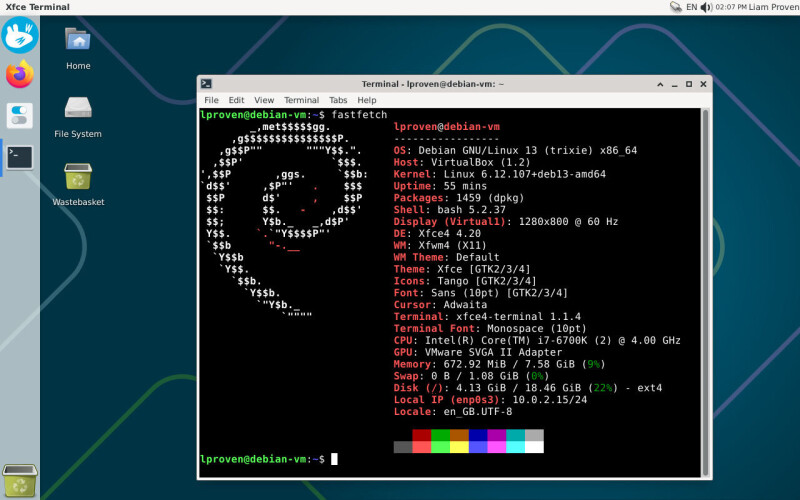
Xfce's Panel Profiles app allows users to rearrange their desktop, offering alternative layouts such as macOS, Unity, MATE, GNOME 2, and various Windows-like styles. However, the macOS-style and Unity layouts require some adjustments to achieve an ideal appearance.
For the Unity layout, the global menu is positioned immediately after the status icons, which should be placed on the right side. This issue can be resolved by adding a separator to the top panel, pushing the status icons and session controls to the right. To achieve a more Mac-like look, the label on the Whisker menu can be hidden by right-clicking the menu button, selecting Properties, and changing the "Display" option to "Icon" under the Appearance tab.
In terms of the Dock, both layouts utilize Xfce's default Window Buttons app-switcher, which lacks the ability to pin apps. This results in redundant app icons, with one for opening the application and another to indicate its open status. A more space-efficient solution is to use the macOS-style Docklike Taskbar plugin, which combines pinned launchers and running-app indicators in a single strip of icons.
This plugin allows users to pin app icons, display colored bars for running windows, and even show preview thumbnails for windows. Additionally, the Docklike Taskbar plugin is a native Xfce tool, lightweight, and can be configured in the same manner as other desktop components.
Written by urgent.news from The Register Software's reporting — not their text. Machine-written — may contain errors; check the original before relying on it.
This story
This is one outlet's version. Read the fullest account.
- Give Xfce a Mac or Unity-style makeover theregister.com