PowerToys has quietly turned into the best free app on Windows, and most people still only use it for FancyZones
Hidden PowerToys utilities quietly streamline Windows work with a keyboard launcher, cross‑PC input, and monitor tools.
PowerToys, a free application developed by Microsoft, has quietly become one of the best tools available on the Windows operating system. Despite its extensive features, many users still only utilize it for FancyZones, overlooking the myriad other capabilities the app offers. PowerToys provides a range of functionalities, from unlocking files and modifying registry entries to enabling mouse sharing between two Windows PCs and utilizing a keyboard-driven launcher to enhance productivity.
Among the standout tools in the PowerToys suite is the Command Palette. This launcher tool can replace the Start menu, allowing users to perform multiple actions using just the keyboard. Whether launching apps, browsing files, accessing URLs, or using other PowerToys tools, the Command Palette streamlines the process. Users unfamiliar with the tool should note that it requires learning specific codes to invoke the desired actions.
Nevertheless, Command Palette offers a faster alternative to the sluggish Windows search experience. Users can extend its search features with additional extensions, such as Everything, which integrates seamlessly into the Command Palette.
The Command Palette also includes a dock, reminiscent of a Taskbar. This dock offers positioning flexibility and the ability to display system statistics in a corner. Users can personalize the dock beyond basic customization options, such as changing the accent color and icon size. Unlike the native taskbar, which lacks customization features, the Command Palette's dock provides greater flexibility.
Another noteworthy feature is the Mouse Without Borders tool, which enables seamless interaction with multiple computers. This tool is particularly useful for users with multiple devices, allowing them to share a mouse and keyboard across multiple systems. It supports four simultaneous connections and maintains a clutter-free workspace by consolidating the need for multiple peripherals.
Mouse Without Borders saves users the hassle of deploying separate remote desktop solutions like Chrome Remote Desktop, as it encompasses all necessary functionalities within a single, integrated tool.
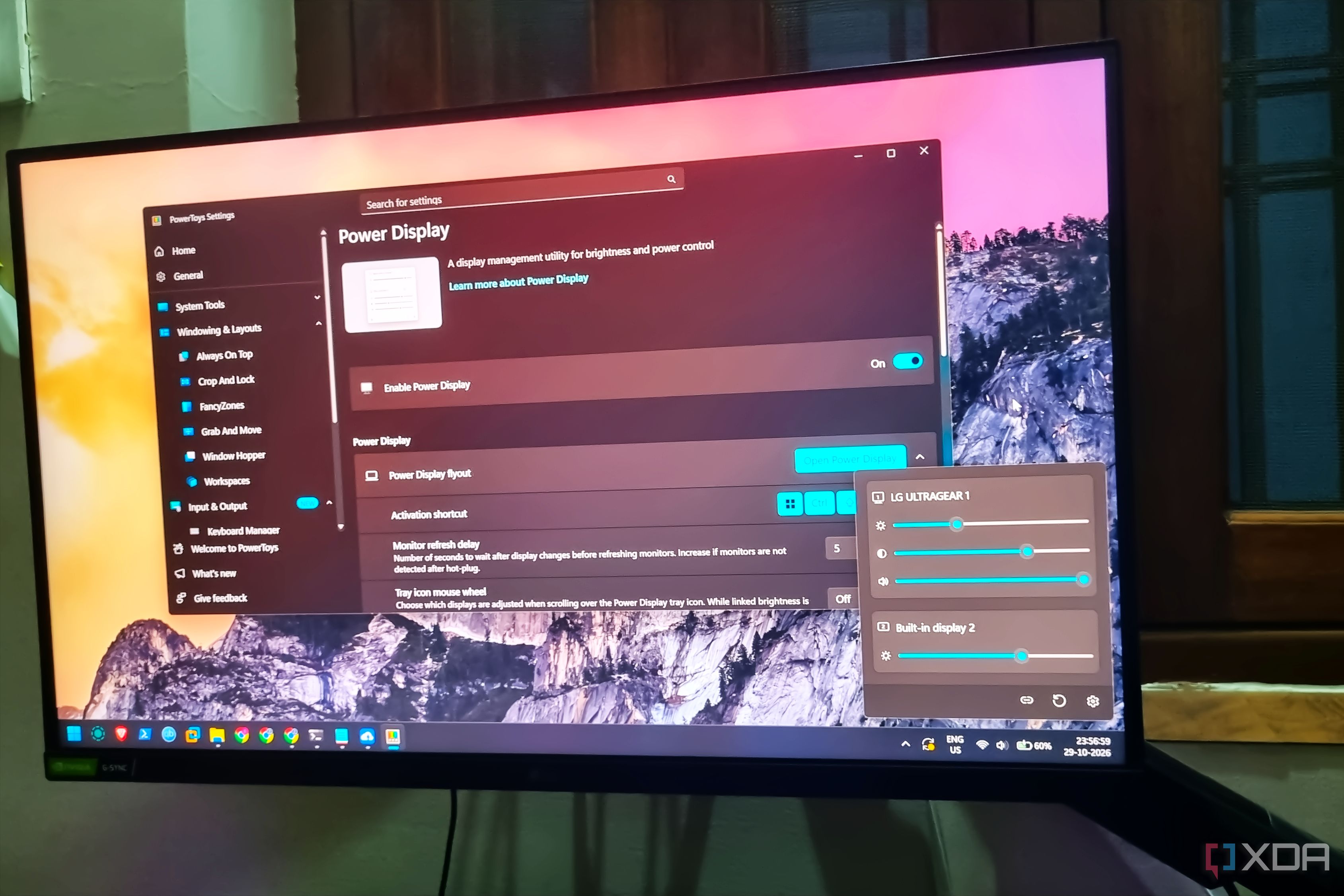
In addition to its powerful features, PowerToys also addresses a longstanding issue in Windows: monitor management. For years, Windows lacked a brightness adjustment slider for external displays, forcing users to rely on physical buttons or third-party tools. PowerDisplay, one of PowerToys' offerings, provides a solution by offering individual brightness sliders for each connected display, along with control over contrast and volume.
While some users may find the default monitor speakers acceptable, PowerDisplay allows for further customization, including rotation, power state, color temperature, and input source adjustments. This comprehensive set of features makes PowerDisplay a valuable addition to the PowerToys suite.
Written by urgent.news from XDA Developers's reporting — not their text. Machine-written — may contain errors; check the original before relying on it.