Adapting a SwiftUI Courier App for iPhone Duo's Foldable Display
How we adapted our courier app for iPhone Duo: reachable navigation, usable side sheets, map framing after resizing, and App Store screenshot preparation.
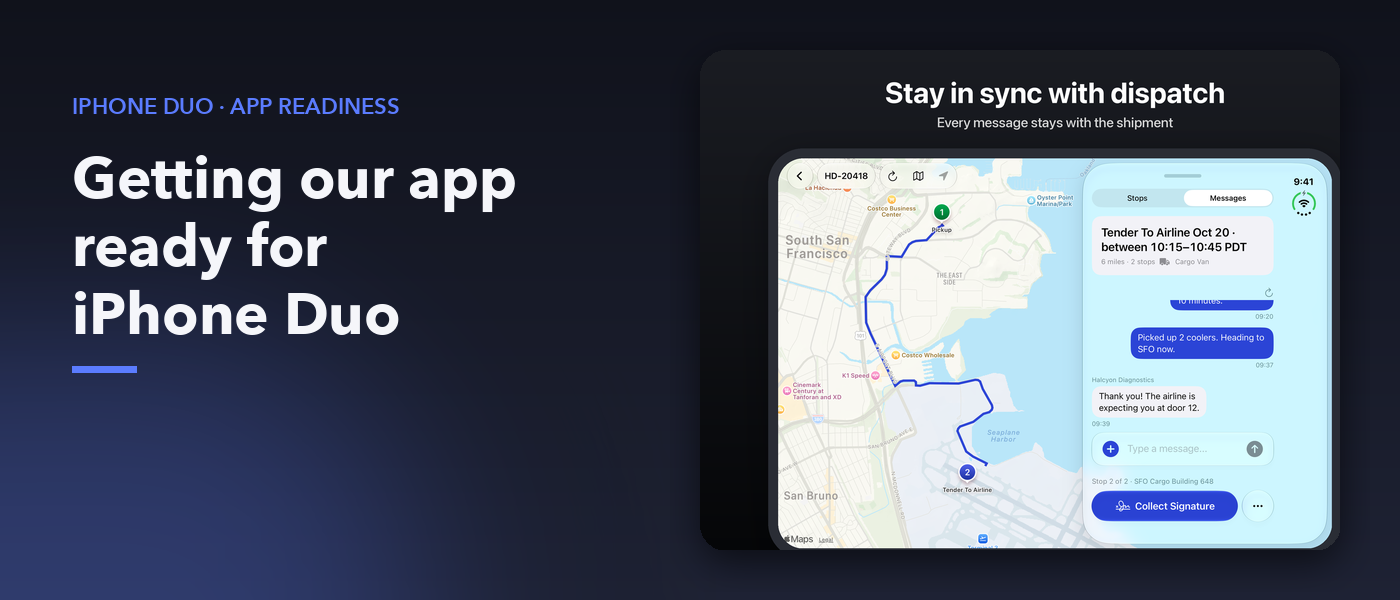
The courier app launched on the iPhone Duo simulator but faced issues with no back button on the Messages screen and limited visibility of the map route. To address these gaps, the app needed to adapt its interface for the differently-shaped Duo display. Initially, the team used size classes to determine if the sheet would be docked, but this approach didn't accurately predict the sheet's position.
Instead, they measured the sheet and map, comparing the sheet's horizontal position with the map's bounds to determine docking. This adjustment ensured the sheet, map, and navigation remained in sync. The team also had to place the back button in a spot easily accessible to drivers. They did this by hiding the navigation bar when the sheet was docked and displaying actions over the map's top-leading corner.
When the sheet unfolded, the navigation bar was restored. Additionally, the app provided a medium-height sheet, ensuring drivers could see details while still viewing part of the map. The bottom sheet's layout allowed for useful states and transitions, preserving useful actions when the sheet changed placements. Lastly, the map required adjustments to fit within the remaining screen space, accounting for safe-area padding and refitting the route after layout changes.
These adaptations improved the app's usability on the iPhone Duo, ensuring a seamless experience despite the device's unique foldable display.
Written by urgent.news from HackerNoon's reporting — not their text. Machine-written — may contain errors; check the original before relying on it.
This story
This is one outlet's version. Read the fullest account.
- 10 Apps to show off your new iPhone Duo's foldable features appleinsider.com