The Android launcher nobody talks about that actually beats the giants
A hidden gem worth your attention
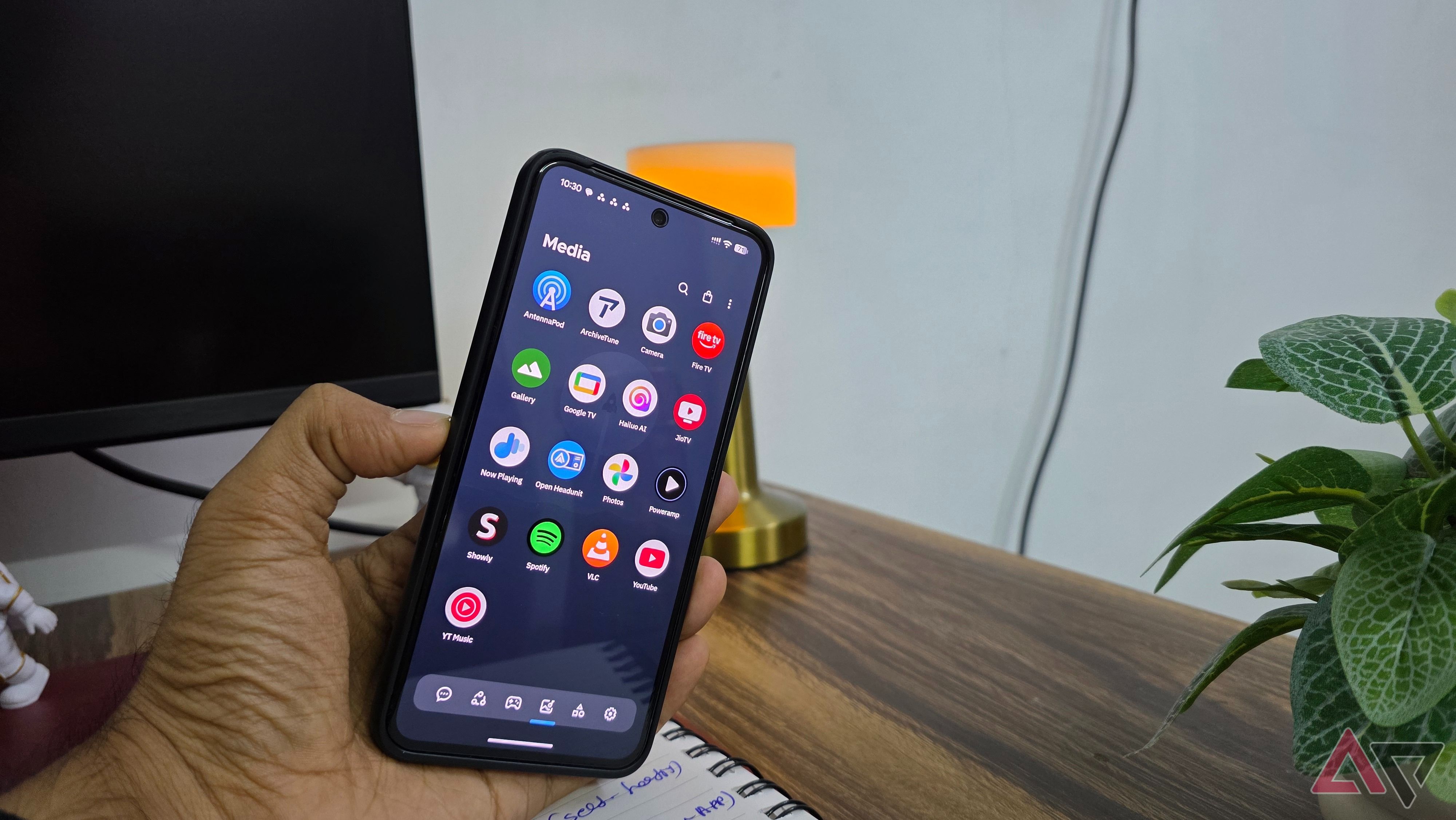
When it comes to the best Android launchers, well-known options such as Nova, Niagara, and Action often take the spotlight. However, one launcher that frequently gets overlooked despite its impressive features is Smart Launcher. There are several reasons why Smart Launcher is worth considering. One of the biggest issues I have encountered with most Android launchers is their handling of the app drawer.
An alphabetical list or a traditional grid can work, but they both feel inefficient when you have numerous apps installed. Instead of cluttering the app drawer with a long list, Smart Launcher automatically organizes apps into categories like Communication, Internet, Games, Media, and Utilities. For instance, my messaging apps are grouped under Communication, while streaming and entertainment apps have their designated space.
This eliminates the need to manually sort apps into folders. Smart Launcher handles the sorting process effortlessly, and I can even rearrange apps between categories or create custom ones tailored to my preferences. Once accustomed to this organized layout, conventional app drawers on other launchers may start appearing outdated.
Customization is a significant factor that draws me to third-party Android launchers, but setting up the ideal home screen can sometimes feel like a daunting task. Smart Launcher streamlines this process while preserving ample customization options. Whether I prefer a minimalist aesthetic or a home screen bursting with useful information, the launcher accommodates various preferences.
I can apply trendy effects like frosted glass to the app drawer and enable gesture-powered widgets that allow me to swipe up or down on an app icon to view widgets. Smart Launcher strikes a balance between customization and simplicity, which is something I rarely find in other Android launchers. Smart Launcher also impresses me with its gesture customization capabilities.
While gesture features are not exclusive to Smart Launcher, I appreciate how they complement its customizable approach. After setting up preferred shortcuts and developing muscle memory, navigating the phone feels more intuitive. The launcher's theming engine is another aspect that I find impressive. I don't have to spend hours tweaking individual elements to create an appealing home screen.
The Ambient Theme feature automatically adjusts the launcher's colors based on my wallpaper, ensuring a cohesive look when I change wallpapers. While I am not bound to automatically generated colors, Smart Launcher provides extensive control over the appearance. I can customize fonts, icon packs, background colors, and transparency effects, experimenting with different styles, ranging from a clean Material You-inspired design to a vibrant and expressive look.
Smart Launcher also excels with widgets, offering an impressive collection of built-in widgets. In contrast to many third-party launchers that rely on widgets from other apps, Smart Launcher includes weather, calendar, music control, battery indicator, and photo widgets. I appreciate how these widgets seamlessly blend with the launcher's design, particularly when paired with its automatic theming engine.
Smart Launcher also offers widget stacking, allowing me to place multiple widgets in a single space and swipe between them. For example, my calendar, weather forecast, and music controls are stacked in one widget area. This feature saves valuable home screen space and provides quick access to multiple widgets simultaneously. While the search functionality in third-party Android launchers may not be a major selling point, Smart Launcher's search feature deserves mention.
It allows me to search for contacts, shortcuts, files, and other information within the launcher. Additionally, it supports quick calculations, unit conversions, and web searches. Although Smart Search alone may not be enough to persuade someone to switch launchers, it exemplifies Smart Launcher's attention to detail. Ultimately, Smart Launcher provides a unique personality to the Android home screen without compromising practicality.
While familiar names like Nova and Niagara have dedicated communities, Smart Launcher offers a refreshing alternative for those looking to revamp their home screen experience. If you have been using the same launcher for years or feel your home screen could benefit from a makeover, I highly recommend giving Smart Launcher a try.
Written by urgent.news from Android Police's reporting — not their text. Machine-written — may contain errors; check the original before relying on it.
This story
This is one outlet's version. Read the fullest account.
- Android handhelds just got a massive multitasking upgrade with this launcher androidauthority.com