This new Android app fixes everything wrong with Google Clock
Pixel Clock shows what Google Clock could and should be.
Google's Clock app has long been criticized for its lack of functionality and infrequent updates. Users have struggled with alarms not sounding and Google's slow development timeline. In search of a better alternative, I discovered Pixel Clock, an Android app that has quickly become my go-to timing solution.
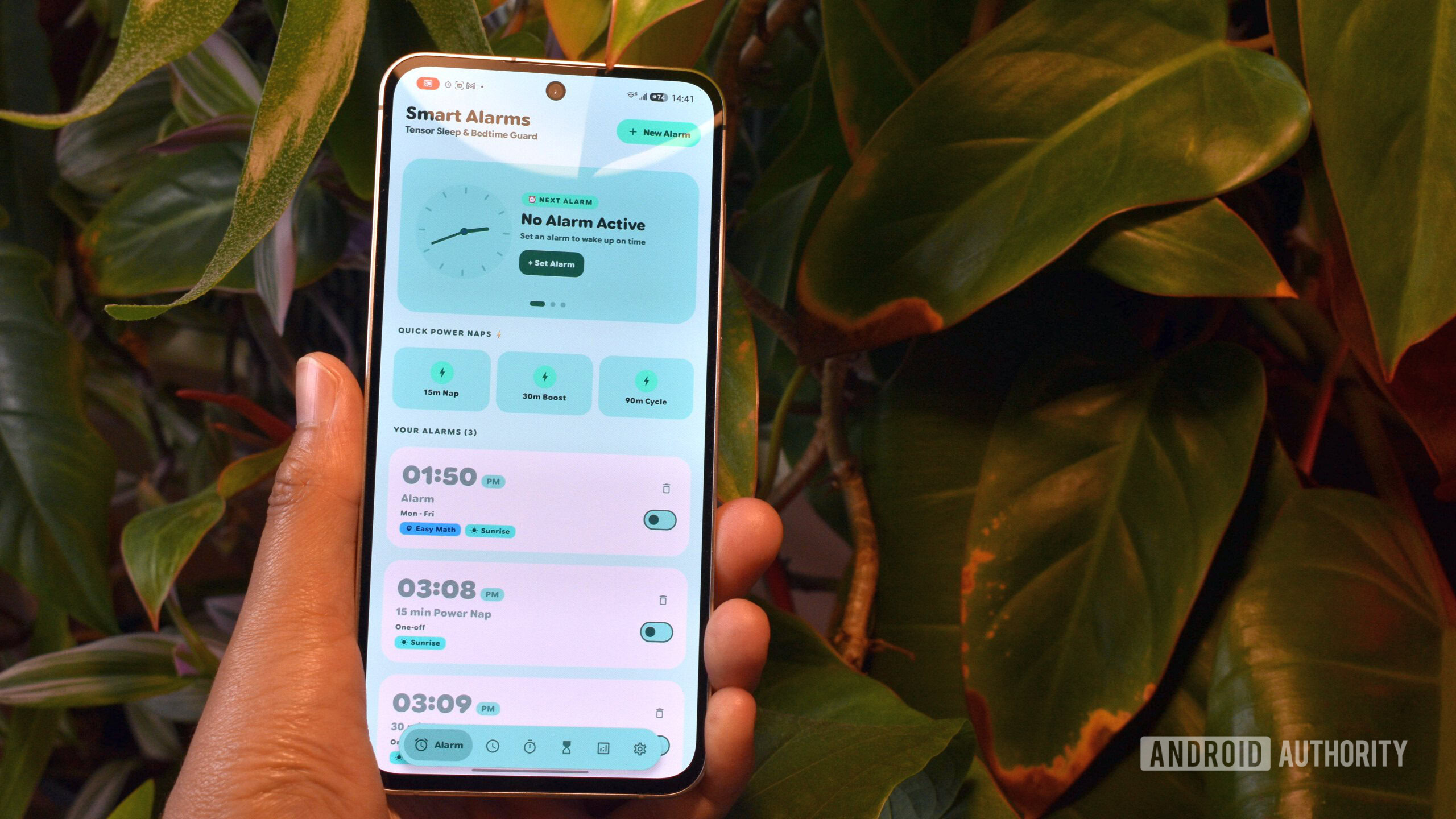
Pixel Clock stands out from the competition with its comprehensive set of features and modern design. Inspired by Google's Material 3 Expressive elements, the app's appearance is sleek and intuitive, mirroring the aesthetics of a Google product. It offers a bottom-floating pill with shortcuts to various tabs and core functionalities, making navigation and usage seamless.
The app supports multiple time-related features, including a world clock and stopwatch. However, Pixel Clock goes beyond these basic functionalities. One of its standout features is the ability to create alarms with "Wake-up missions," which are math problems that must be solved before the alarm can be dismissed. While the app currently offers addition, subtraction, and multiplication puzzles, it could benefit from additional options like NFC tag support or a photo challenge.
Another unique feature is the app's alarm presets specifically designed for napping. With a single tap, users can set 15, 30, or 90-minute alarms for brief breaks or reminders. The "Pixel Timer" feature is my personal favorite, offering a sophisticated timer interface that caters to focused work sessions. Users can easily choose Focus periods ranging from 15 to 50 minutes or take a 5-minute break, encouraging quick and decisive action while minimizing friction to interact with the phone between work sessions.
Pixel Clock's timer functionality extends beyond typical Pomodoro methods, with a "Smart Presets & Focus Blocks" option that provides a variety of set time spans and intervals for different needs. Users can access 16:8 fasting timers, 8-hour work shift calculators, and shorter study blocks. The app's layout allows for future additions of new presets as it matures.
For longer timers spanning hours or days, Pixel Clock transforms into an event countdown tool. I've even replaced a dedicated app called Hurry with this feature. Additionally, the Stats page at the bottom of the tab bar provides analytics on various timer metrics, helping users optimize their study or focus habits. While I haven't fully explored this feature yet, I can see its potential for users looking to fine-tune their daily routines.
Despite its many strengths, Pixel Clock is not without its flaws. During its early development, the app experienced some bugs, such as a completely white background for the Pixel Timer screen even in dark mode. However, these issues have since been addressed. Notably, the initial version lacked an alarm facility, which the developer quickly added, demonstrating their commitment to improving the app.
Overall, Pixel Clock is an impressive Android app that surpasses the capabilities of Google Clock. Its comprehensive feature set, modern design, and user-friendly interface make it an excellent alternative for anyone seeking a reliable and feature-rich timing solution. While there is always room for improvement, Pixel Clock has quickly become an essential tool in my daily routine, replacing multiple other apps in the process.
Written by urgent.news from Android Authority's reporting — not their text. Machine-written — may contain errors; check the original before relying on it.