iOS 27: Use Visual Intelligence in the Camera App
In iOS 27, available now, Apple has made some changes and additions to the iPhone's stock Camera app, including the addition of a new Siri mode. Available in addition to the Video, Photo, and other camera modes, Siri mode can be accessed by swiping across the mode carousel at the bottom of the screen. The new mode uses Visual Intelligence to identify objects in the frame and provide information…
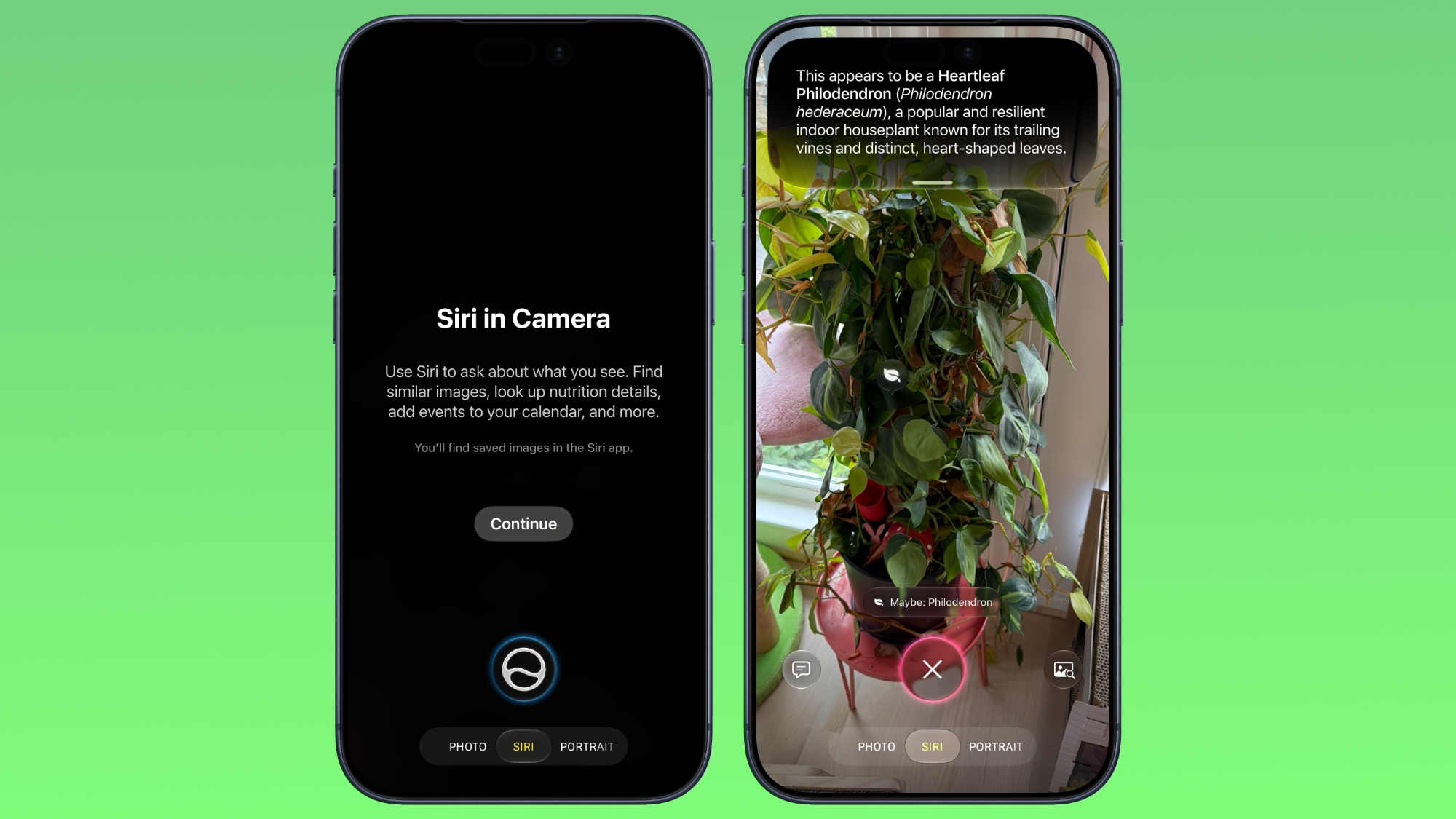
Apple's iOS 27, launched on September 14, introduces several enhancements to the iPhone's default Camera app. Among these updates is a new Siri mode, accessed via a swipe on the mode carousel at the bottom of the screen. This mode leverages Apple's Visual Intelligence to recognize objects in the camera frame and provide relevant information. For instance, it can identify plants, animals, food, and more, offering details such as the object's name and nutritional information for food items.
Siri mode extends its usefulness to practical scenarios, such as capturing event flyers and automatically adding the event date to the Calendar app, facilitating text translation, and even splitting bills. Within Siri mode, users can search Google Images by tapping a button on the right and pose specific questions by tapping a button on the left. This allows for tasks like seeking cooking advice for the food in the frame.
Apple also refined the camera interface in iOS 27. Key quick access tools for functions like flash activation, Live Photo, and Night mode are now positioned at the top-center of the user interface, while the comprehensive toolset can be accessed from the bottom-right corner. Additionally, users can personalize the display of controls at the top of the screen. iOS 27 became available for download on supported iPhone models on the same day it was unveiled, preceding the release of the iPhone 18 Pro models on September 18.
Written by urgent.news from MacRumors's reporting — not their text. Machine-written — may contain errors; check the original before relying on it.