HWiNFO lets you see exactly what your PC hardware is doing
HWiNFO combines detailed system information with extensive sensor monitoring, making it useful for checking temperatures, power usage, clock speeds, and other hardware behavior in real time. It can also help troubleshoot performance issues. Read Entire Article
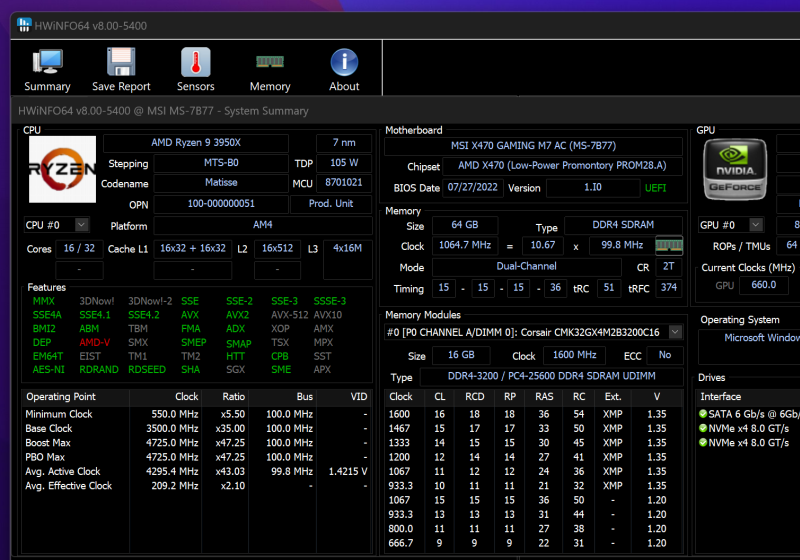
HWiNFO64 provides thorough, real-time data about every component in a PC, such as the CPU, GPU, motherboard, RAM, storage devices, and sensors. This versatile tool caters to enthusiasts, system integrators, and IT professionals who need comprehensive hardware insights.
The software offers highly detailed reports, customizable alerts, and extensive logging capabilities. Users can monitor essential metrics like CPU core temperatures, CPU package temperatures, GPU temperatures, VRM temperatures, and critical voltages. For AMD processors, Tdie or Tctl are often used; for Intel CPUs, the highest core temperature is crucial.
The Sensors-only mode presents a concentrated view, while enabling logging assists in tracking performance or identifying issues over time. HWiNFO data is reliable and accurate, offering comprehensive hardware information for your PC.
The interface is divided into three windows: a system summary, a full report, and active sensor readings. HWiNFO64 can monitor VRM temperatures if your motherboard supplies this data, typically labeled as VRM or MOS in the sensors list. If no such label appears, your motherboard likely lacks a sensor for that component. It's important to note that HWiNFO was primarily designed for displaying system information, not controlling fan speeds.
For fan control, consider specialized tools like SpeedFan or FanControl, both of which are free and extensively tested.
HWiNFO is compatible with Windows 7, so ensure you download the appropriate version for your operating system. HWiNFO32 works with Windows 95 and later 32-bit versions, while HWiNFO64 is compatible with Windows XP and later 64-bit systems. A DOS-compatible version is also available.
This powerful tool displays hardware components in a hierarchical format, providing deep details. It's useful for obtaining a detailed hardware inventory report or verifying various hardware-related parameters. HWiNFO also excels at real-time monitoring of diverse system and hardware parameters, including CPUs, GPUs, mainboards, drives, peripherals, and more.
It can detect overheating, overload, performance loss, or potential failures. The software presents hardware hierarchy information or offers a quick summary overview. Users can export data into XML, CSV, HTML reports, and configure system monitoring in customizable tables, graphs, tray icons, and OSD. HWiNFO64 also allows for custom alerts based on any monitored parameters, with user-defined actions. The software interfaces with other applications and supports third-party extensions.
Written by urgent.news from TechSpot's reporting — not their text. Machine-written — may contain errors; check the original before relying on it.