CleanMyMac CLI: Cleaning a Mac Dev Environment Without Leaving the Terminal
CleanMyMac CLI brings Mac cleanup to the Terminal, helping developers remove caches, build artifacts, Docker data, and project clutter safely.
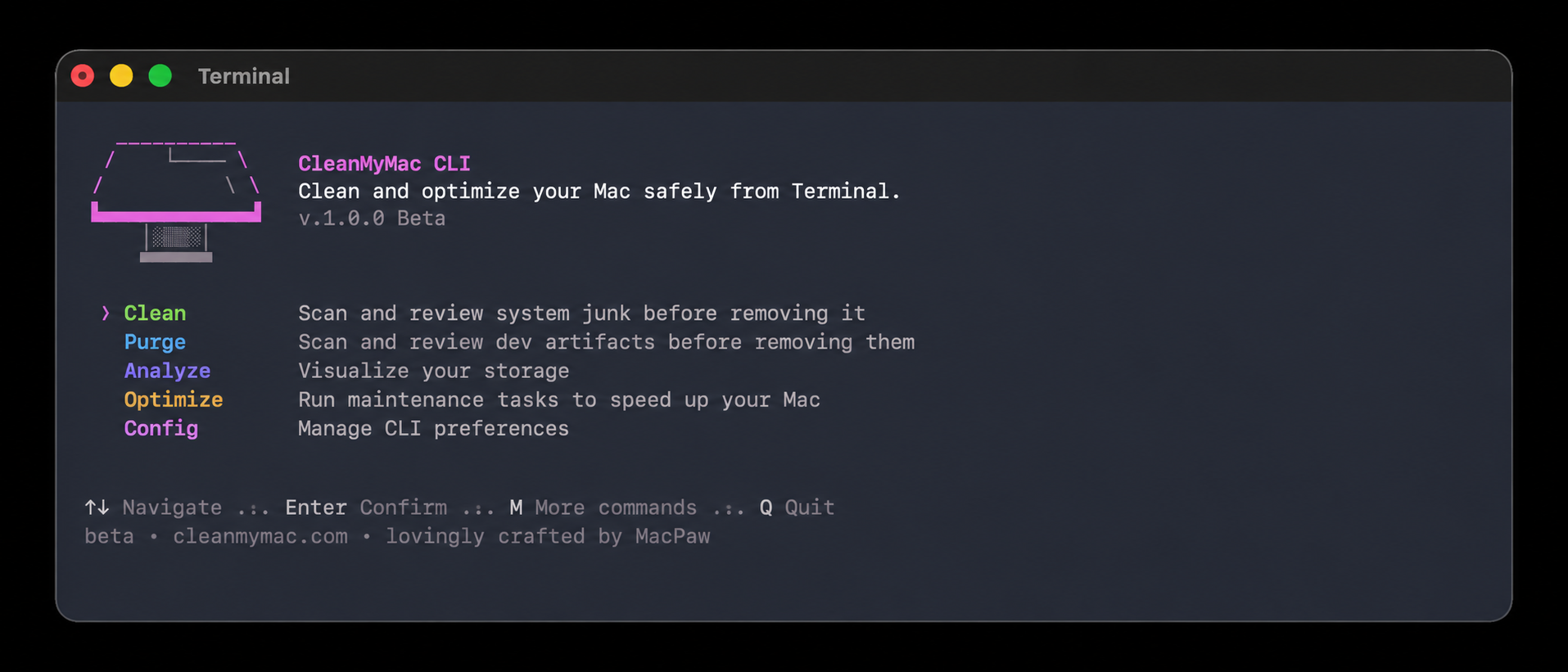
Developers spend much of their time in the Terminal, where projects are built, logs checked, and scripts executed. However, this same environment can fill up over time with caches, old build artifacts, Docker layers, Xcode remnants, and other debris. To address this, CleanMyMac now offers a command-line version that runs entirely in the Terminal, allowing developers to declutter their development environment without leaving their current workflow.
CleanMyMac CLI inherits the cleanup logic from the desktop app and presents it as a series of commands that can be executed in any shell. This tool organizes its work into four main areas: cleaning caches and system junk, purging old project artifacts, analyzing disk usage, and running quick optimization tasks. Each of these corresponds to a single command, and every command displays what it discovers before any removal occurs.
The development team behind CleanMyMac CLI created this tool based on their own experience. As developers, they frequently use the Terminal, and they didn't want to interrupt their workflow to run a graphical cleanup application. By providing a command-line interface, they aimed to clear developer clutter in the same place where they already work.
To install CleanMyMac CLI, macOS 11 (Big Sur) or later and Homebrew, a package manager commonly used by Mac developers, are required. Installation is straightforward through a Homebrew tap: brew install --cask macpaw/taps/cleanmymac-cli. After installation, running cleanmymac --version confirms the build, and simply executing cleanmymac opens an interactive menu. The commands can also be used directly, making the tool suitable for use in scripts.
The tool's main command, clean, addresses the accumulation of leftovers outside individual projects. When run alone, it tackles three categories of clutter: developer-tool caches, system junk, and the trash. Other specialized commands include cleanmymac clean dev, which targets cached packages and build files generated by developer tools like Homebrew, npm, Yarn, pnpm, pip, Cargo, Docker, VS Code, JetBrains, and Xcode; cleanmymac clean junk, which focuses on system-level developer junk such as user logs and Xcode DerivedData; cleanmymac clean ai, which identifies artifacts left by AI tools; and cleanmymac clean trash, which empties the trash bins.
The purge command targets generated files residing within project folders, such as node_modules, virtual environments, and build directories. By scanning common developer locations (~/Projects, ~/Code, ~/dev, ~/GitHub, and ~/Workspace), CleanMyMac CLI groups the found artifacts by project, allowing users to see what is tied to each recognizable project.
Artifacts older than seven days are preselected for removal, while more recent items are shown but not deleted by default, minimizing the risk of removing active work files. Users can scan a single folder with cleanmymac purge . For a more comprehensive overview, the analyze command provides an interactive view of storage usage, sorted by size, with the option to reveal any item in Finder. Removal always requires deliberate selection, preventing accidental deletions.
Several safeguards are built into CleanMyMac CLI to minimize accidental deletions. By default, the tool waits for confirmation before deleting anything, and the default response to this confirmation is always "no." Additionally, critical system locations are visible for context but cannot be selected, and users can add specific paths to an ignore list to prevent them from appearing in future scans.
A --force flag is available for scripted use, allowing users to skip the confirmation prompt, but it is recommended to run a command without this flag first to review the results.
Privacy concerns are addressed by CleanMyMac CLI, as it does not upload source code or personal files. Users can also disable analytics in cleanmymac config if desired. It is worth noting that CleanMyMac CLI is closed source, being proprietary software owned by MacPaw. While this might raise some eyebrows, the developers justify this decision by stating that the scanning and cleanup logic is the core of the product, refined over more than a decade of developing Mac cleanup software.
The closed-source nature allows the team to maintain a tool that is backed by their expertise, with support and accountability in case of any issues, rather than relying on a script that would need to be audited before being trusted in a work environment.
Written by urgent.news from HackerNoon's reporting — not their text. Machine-written — may contain errors; check the original before relying on it.