How canvases make agentic workflows visible, steerable, and cost-efficient
Chat is great for intent, but agent work gets lost in the scroll. Here is how I use canvases with my agentic workflows—and why your workflow also deserves a canvas. The post How canvases make agentic workflows visible, steerable, and cost-efficient appeared first on The GitHub Blog .
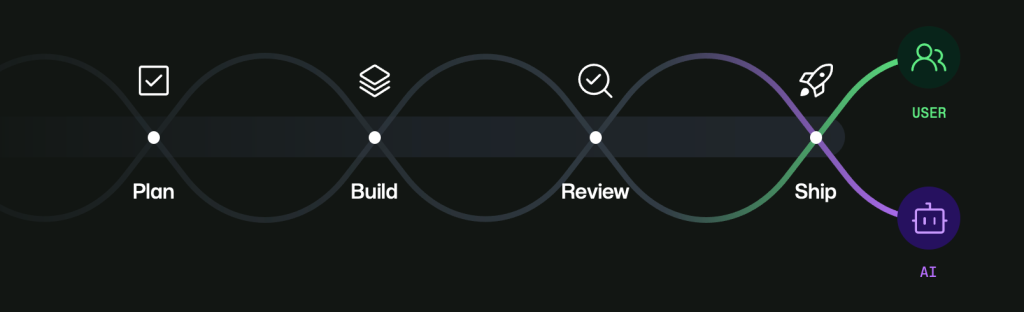
In recent years, generative AI (GenAI) has revolutionized software development, enabling hybrid teams of agents and humans working together. While new tools have emerged to plan, build, review, and ship code, many workflows still feel disjointed. Context gets lost across threads and surfaces, and human review often falls behind agent-generated work that can progress too quickly. The GitHub Copilot app addresses this issue by introducing canvases—durable, shared surfaces where developers and agents can interact.
Canvases make work visible, steerable, and approvable as it unfolds. They bridge the gap between chat (ideal for intent) and agent execution (where the actual work happens). With canvases, humans can inspect and guide workflows while agents update and progress, keeping both aligned without constantly replaying context. The first canvas built was Java Modernization Studio, which handled assessment, planning, migration tasks, validation gates, and readiness for shipping.
By making each phase explicit and inspectable, teams could verify what had happened instead of just guessing.
Another canvas, Site Studio, was built for creating and managing personal site content. Its challenge lies in section progress, iterative edits, review loops, and status transitions. In a chat-only context, content can quickly drift, and feedback can get scattered. Site Studio keeps section status visible, persists draft values, and makes explicit review points. Agents can keep moving while humans steer, approve, or redirect without losing the thread.
Both canvases follow the same blueprint: define workflow states clearly, surface crucial decisions, persist progress and drafts immediately, and keep explicit human approval points. This shifts the model from prompt-by-prompt interaction to durable collaborative workflows. While canvases can be an investment—Site Studio cost about 2,000 AI credits, and Java Modernization Studio cost about 3,000 AI credits—the long-term benefits are significant.
Durable surfaces reduce repeated prompting, minimize context loss, cut unnecessary back-and-forth, and reduce rework. Over time, this can save time and money while improving trust and throughput.
The canvases built by the author are now available in awesome-copilot for anyone to use, adapt, or learn from. If you use Copilot agents, a practical next step is to identify one repeated workflow and build a minimal canvas around it using the /create-canvas command. Start small, run real work, and iterate based on actual usage.
If it helps your team, contribute your canvas back to awesome-copilot so others can benefit as well. As we continue this transition, agents can accelerate execution, humans provide vision, judgment, and accountability, and canvases make that partnership real, durable, and scalable.
Written by urgent.news from GitHub Blog's reporting — not their text. Machine-written — may contain errors; check the original before relying on it.