I gave ChatGPT access to my mess of open Chrome tabs — and it turned my browser clutter into something genuinely useful
ChatGPT's new Side Chat features bring the AI directly into the pages you're already browsing.
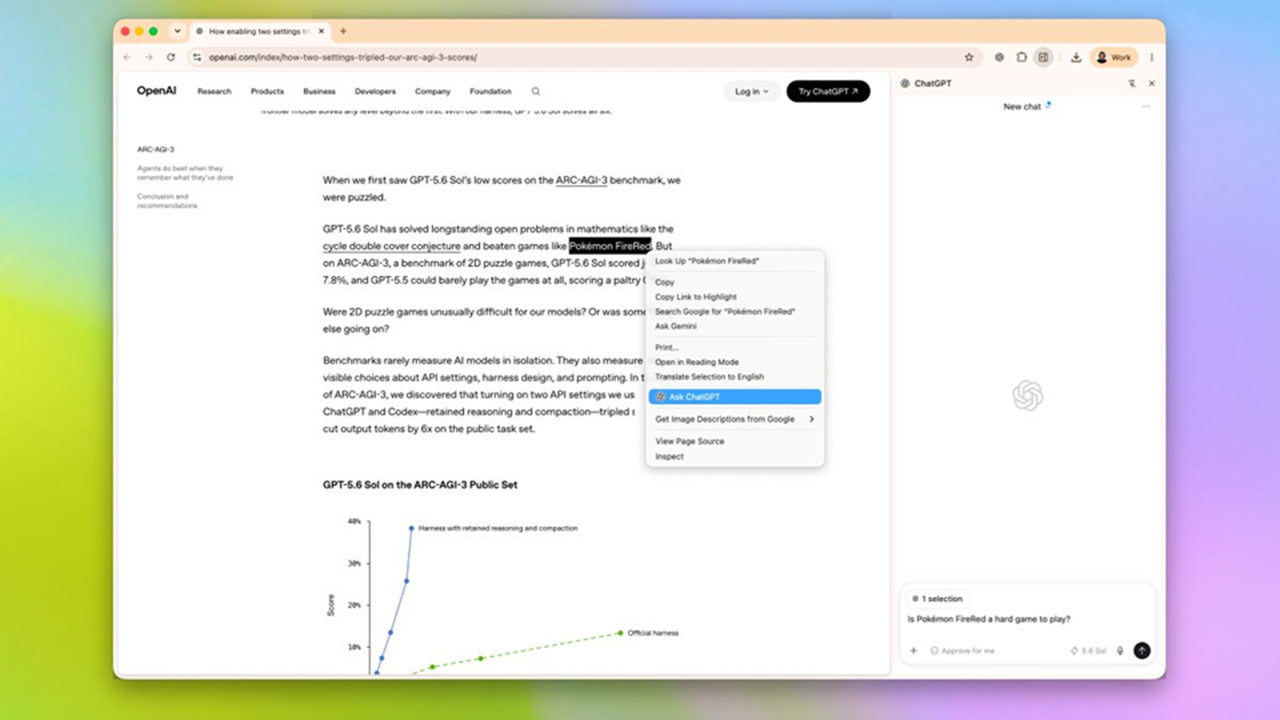
ChatGPT's browser extension has evolved since its debut in 2024, moving beyond merely seeing which websites the user visits. The latest update introduces several intriguing features centered around the Side Chat window, which appears on the side of the webpage. This feature allows users to ask questions directly about the website they are viewing without needing to copy links or paragraphs into ChatGPT.
One notable enhancement is the extension's ability to explain highlighted text. Users can highlight sections of an article or webpage and ask ChatGPT to explain them as if they were talking to someone who has little to no knowledge of the subject. This feature can be particularly useful for breaking down complex concepts or providing context in an interactive manner.
Another significant improvement is the extension's capability to summarize YouTube videos. Users can open a video, open Side Chat, and ask ChatGPT to summarize the video in bullet points. Additionally, the AI can identify and highlight the timestamps for specific sections of the video that are relevant to the user's interest. This feature saves time and allows users to quickly access the parts of the video that matter most to them.
Perhaps the most impressive feature is the extension's ability to compare information across multiple open tabs. Users can have ChatGPT analyze tabs containing different pieces of information, such as weather forecasts, restaurant reviews, or hiking guide maps. By leveraging this feature, users can receive well-organized recommendations.
For example, given a set of open tabs containing a hiking trail guide, a weather forecast, a local museum, and a nearby pizza restaurant, ChatGPT can suggest an optimal itinerary for a Saturday afternoon. The AI takes into account factors like weather conditions, opening hours, and travel time to create a seamless and efficient plan.
In a demonstration of these features, the writer used Side Chat to analyze a long YouTube video about Spider-Man's history. By having ChatGPT summarize the video and outline the differences between comic Spider-Man and movie versions, the user could quickly decide whether to watch the entire video or skip to specific segments. This feature turned a potentially tedious browsing experience into an efficient and informative one.
Similarly, the writer tested the extension's ability to handle multiple open tabs simultaneously. By opening tabs for a weather forecast, local museum, pizza restaurant, and hiking trail guide, ChatGPT was able to analyze all these tabs and provide a well-reasoned recommendation for a perfect Saturday afternoon. The AI's ability to connect information from unrelated tabs felt like having a personal assistant, streamlining the browsing process and providing highly relevant insights.
Finally, the writer explored the highlighted text feature, which allows users to highlight sections of text and ask ChatGPT to explain them as if they were talking to someone with limited knowledge of the subject. This feature proved particularly useful when reading dense articles, as the AI could quickly focus on the highlighted sections and provide clear explanations without requiring the user to manually paste the text into a separate conversation.
Overall, ChatGPT's browser extension has proven to be a versatile and useful tool for enhancing everyday browsing experiences. From summarizing long videos and comparing information across tabs to explaining complex concepts and creating personalized itineraries, the AI has proven to be a valuable companion in the digital realm. While it may not yet be a user's default AI interface, the extension's utility in providing context and reducing browsing friction makes it a worthy addition to any modern web browser.
Written by urgent.news from TechRadar's reporting — not their text. Machine-written — may contain errors; check the original before relying on it.
This story
This is one outlet's version. Read the fullest account.