Kensington Expert Mouse Pro TB900 review: I swapped my mouse and trackpad for the new TB900 trackball, and ran a head-to-head video edit against my usual setup — the trackball won.
I ran a head-to-head video editing tests against my usual setup, and found the TB900 faster and more intuitive editing across creative applications.
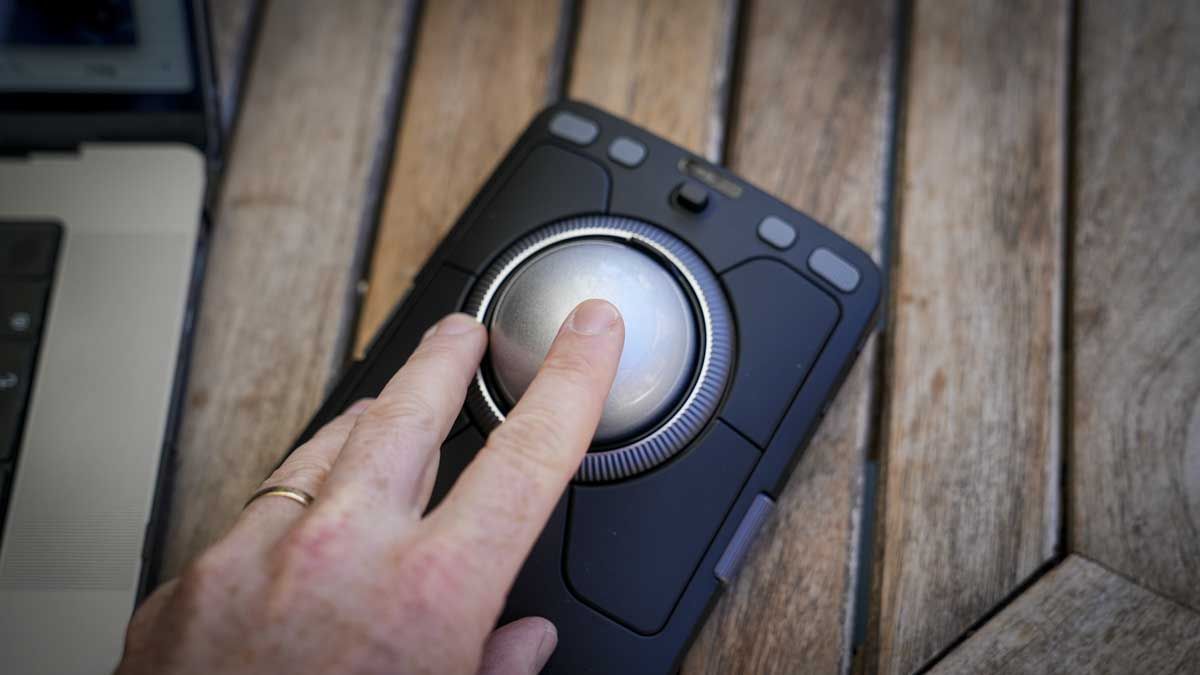
Kensington has introduced the Expert Mouse Pro TB900, a large trackball device that aims to replace traditional computer mice and trackpads. This new version is a substantial unit, situated where a mouse would normally be, featuring a large central trackball with assorted controls around it. The setup process on Mac took a bit longer than anticipated, necessitating a couple of restarts and security authorization in System Settings.
However, once configured, Kensington Konnect software handles all the customizations per application. The TB900 EQ was tested in both wired and Bluetooth connections, both of which proved fast and responsive for video and photo editing, as well as for basic tasks like Word and Excel.
Customizing the device for specific applications is straightforward through Kensington Konnect, which automatically assigns presets as applications come to the forefront. In Final Cut Pro, many of the defaults were already close to the user's preferences, with the dial around the main ball set for scrubbing, the lower-left button for blading, and the right button for selecting.
This setup allowed for the four most common movements (left, right, up, down) without relocating the hand. A notable test involved editing the same footage once using a conventional setup and once with the trackball, with the latter proving faster despite the user's years of muscle memory with a traditional mouse.
The TB900 EQ's design is striking yet sizable, with a desktop footprint of 125 x 165mm and a height of about 60mm, including the ball. Weighing in at just under 450g, the device is heavier than average, ensuring stability on the desk. The design offers a range of buttons and controls, including four around the ball, a 360-degree scroll ring, two side scroll dials, and two additional buttons on top.
The ball itself is 55mm in diameter, removable, and coated with Kensington's Diamond Eye optical tracking technology. Controls like the scroll ring, side dials, and top buttons are fully customizable through Kensington Konnect, allowing for personalized shortcuts and efficient workflows.
Written by urgent.news from TechRadar's reporting — not their text. Machine-written — may contain errors; check the original before relying on it.