I replaced Todoist, Toggl, and my Pomodoro timer with one free app that does it all
One app to rule my workflow
For a long time, my productivity setup involved using multiple apps, including Todoist for task management, Toggl for time tracking, and a separate Pomodoro timer to maintain focus. This setup became complicated, and I discovered Super Productivity, a free, open-source app that integrates all these functionalities into a single workspace.
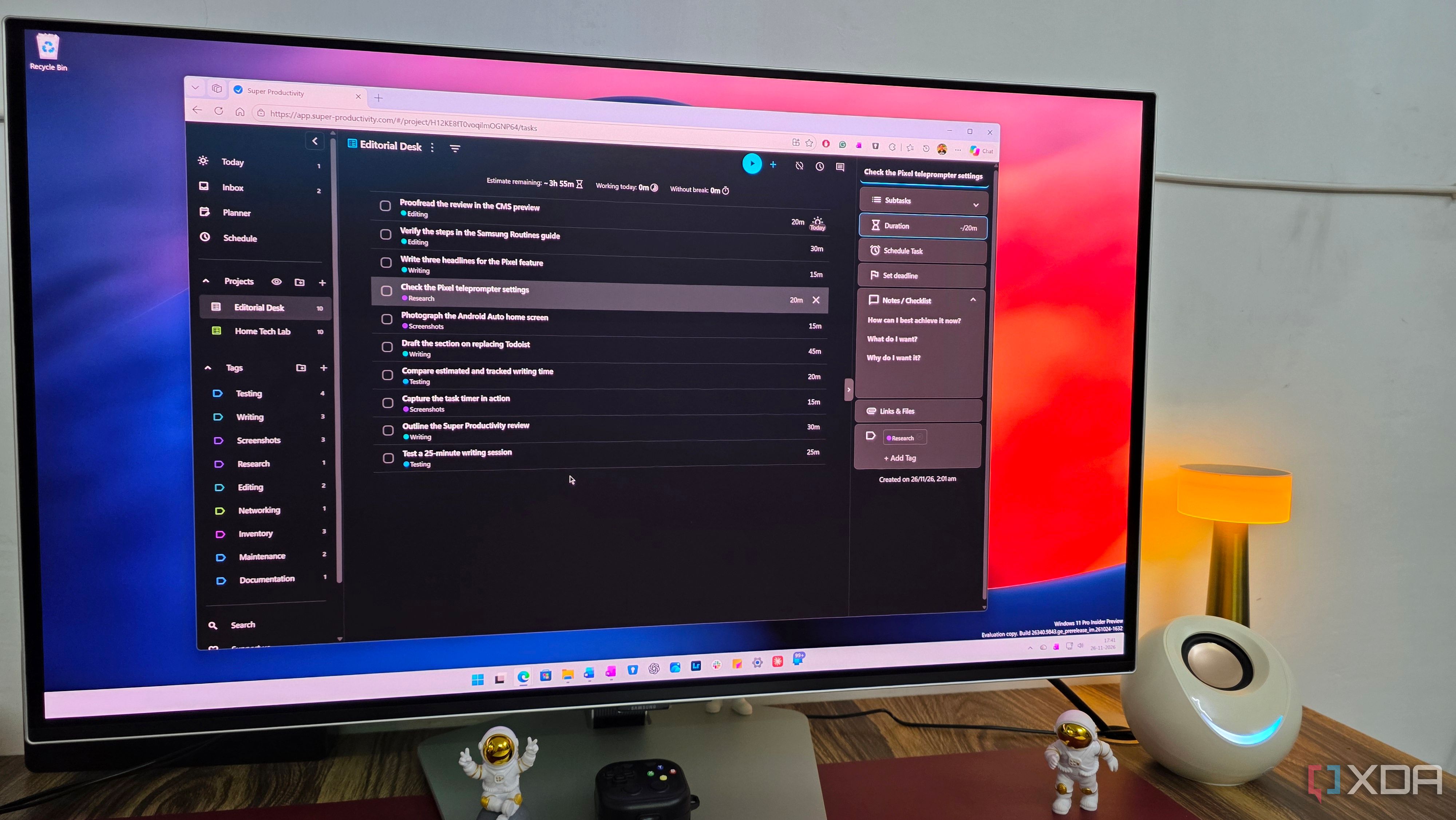
Upon first using Super Productivity, I was impressed by its modern interface with a polished gradient theme, which rivalled the appearance of expensive alternatives. The app's organization and visual design were notably superior to those of open-source apps I had used before.
Super Productivity matched the flexibility of Todoist, allowing me to create projects for various aspects of my life, break down complex tasks, and create subtasks. Tags and filters helped me organize tasks efficiently, and the Today hub served as a comprehensive workspace where I could see my immediate tasks, rearrange them, and plan my working hours. I found it adaptable to different needs, whether I was managing a grocery list, an editorial calendar, or a large project.
One of the standout features of Super Productivity was its seamless integration of time tracking into the task management process. When creating a task, I could assign a time estimate and start tracking the time spent on it with a single click. This eliminated the need for separate apps and manual entries. For example, when working on an article, I could break down the task into its components, assign time estimates, and track the actual time spent on each activity.
This provided valuable insights into how my time was being spent and whether my initial estimates were realistic.
At day's end, I could review my completed tasks, hours worked, and project-specific time entries. Super Productivity also offered a Focus Mode, which replaced the need for a separate Pomodoro timer. By selecting a task, configuring focus and break durations, and getting started, I could work efficiently without the need for a dedicated timer.
The app's natural language processing allowed me to create tasks simply by typing in a description, such as 'Doctor's appointment on Friday 6 PM.' I could also use the Scheduler to access a Calendar view and plan important tasks, as well as the Metrics menu to examine detailed data about specific projects.
Super Productivity provided a comprehensive productivity solution that, once configured, required minimal manual effort. Its learning curve was steep, particularly in setting up synchronization with Dropbox, which was less intuitive than signing in to a Todoist account. However, once I managed to configure everything to my liking, I found Super Productivity to be a capable and well-rounded productivity tool, comparable to the features offered by Todoist and Toggl.
Its open-source nature meant no recurring subscription fees, no locked features, and complete control over my productivity data. While its feature set and integrations lag behind those of Todoist and Toggl, Super Productivity offers all the essential features and a few extra functionalities at no cost.
Given my experience with multiple productivity apps and associated subscription fees, I believe Super Productivity deserves a place on my desktop. I have no intention of returning to my previous setup anytime soon.
Rewritten by urgent.news; may contain errors — check the original.
Source: xda-developers.com