My Files on One UI 9.5 makes freeing up storage easier than ever
Storage cleanup doesn't feel like a chore anymore.
One UI 9.5 introduces major upgrades to Samsung's My Files app, simplifying the process of freeing up storage space on Galaxy devices. After upgrading to the latest version, the user found My Files to be instrumental in reclaiming 25GB of storage. Previously, My Files provided a storage breakdown menu for reviewing old media, downloads, APKs, and unused apps.
With One UI 9.5, it now includes an additional section called "Removable other files," which lists files under the "Other" category in the phone's storage menu. Users can now directly manage such files from the Manage storage menu in My Files. The app automatically excludes critical files, preventing accidental deletions of important data.
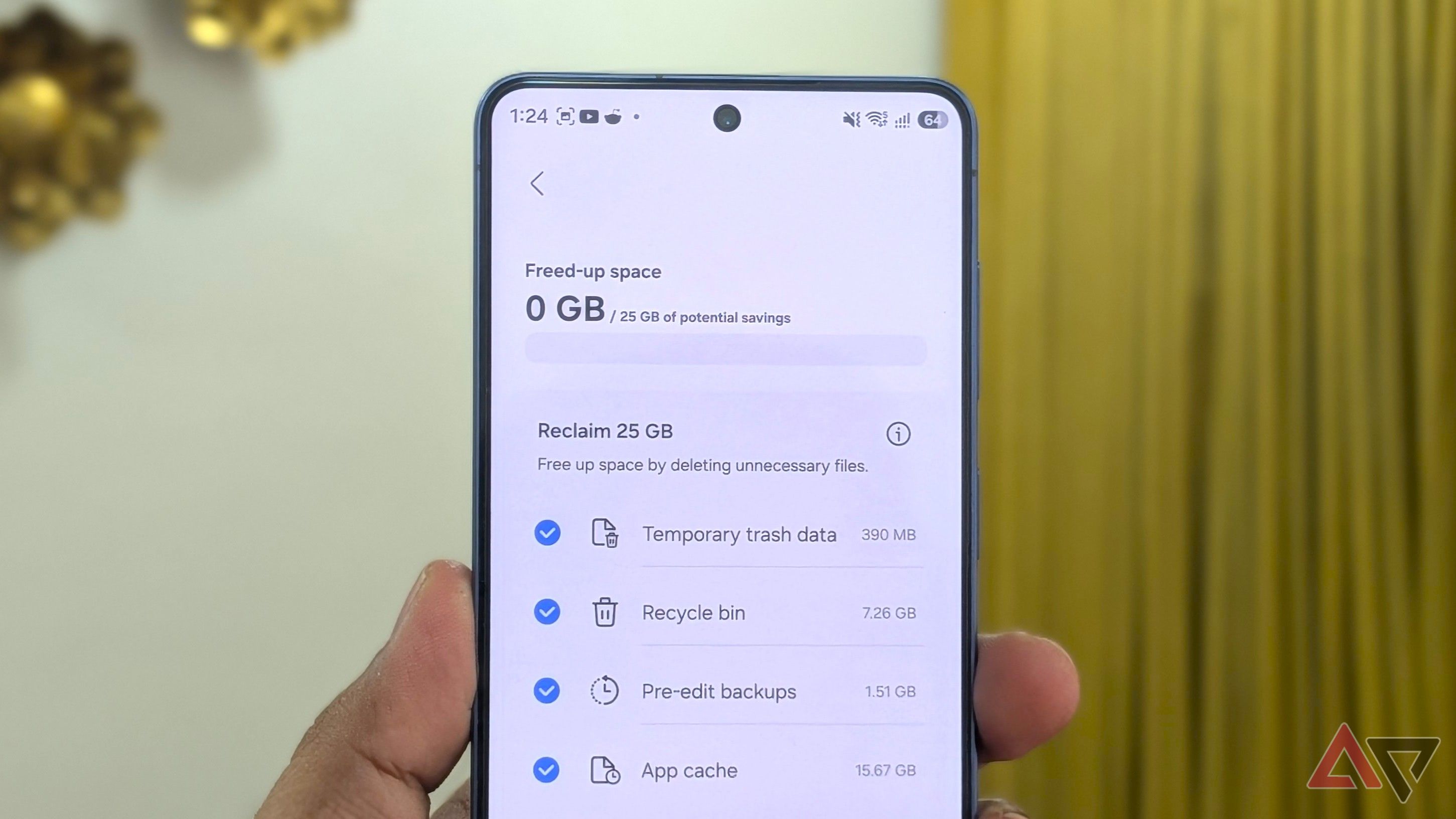
A new standout feature is the "Free up space" option at the top of the app, which provides suggestions for freeing up storage by deleting unnecessary files. These suggestions include emptying the recycle bin, removing log files and pre-edit backups, and clearing app caches. The user found the "Free up space" feature to be highly effective, scanning the phone and revealing a 25GB storage boost.
The suggestions were categorized into pre-edit backups, recycle bin, temporary trash data, and app cache, with each category displaying the exact storage it occupies. By tapping the "i" icon next to a category, users receive a brief explanation of its contents. Safe to delete include pre-edit backups, recycle bin, temporary trash data, and app caches, all of which are generally harmless.
For the user, app caches were the biggest culprit, and clearing them in one go was a significant relief. While storage optimization is an ongoing task, My Files offers a hassle-free solution to free up space on Galaxy phones without deleting apps or photos. The app also provides valuable insights in the storage breakdown menu, such as large files, duplicate files, extracted compressed files, already installed APKs, and the option to dismiss specific suggestions.
Rewritten by urgent.news; may contain errors — check the original.
Source: androidpolice.com