Now Firefox can select which sites use its VPN, and clear your browsing history with one click
Mozilla released Firefox 161 on Tuesday with a new setting you can use to choose which pages automatically open with the browser's VPN active. Using the "Manage VPN rules" option in Firefox's VPN panel, you can set it to "always on" or "always off" for specific sites, so you don't have to toggle it manually […]
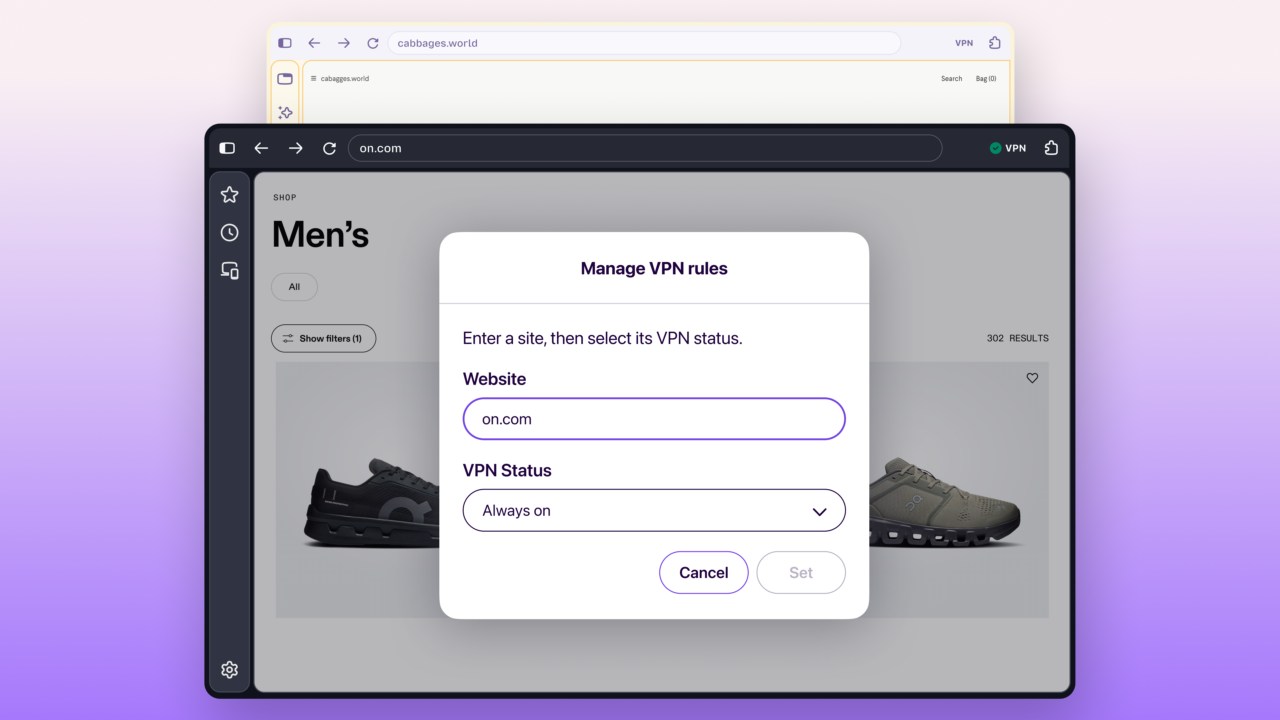
Mozilla has introduced several new features in the latest version of Firefox, including a "Fire" button to quickly clear browsing data and a setting to choose which pages start with the VPN active. The "Manage VPN rules" option lets users set the VPN to "always on" or "always off" for specific sites, eliminating the need to manually toggle it each time.
Additionally, a new "Fire" button in standard Firefox windows allows users to clear their browsing data, including history, downloads, cookies, and more, with a single click. This button can even sign users out of everything and open a fresh Firefox window if set to delete all data. Mozilla also added a keyboard shortcut for copying the current tab's URL and made the "read aloud" option in Reader Mode available on the Android version of Firefox. Furthermore, Firefox is now accessible directly through the Play Store on Google-built-in cars.
Rewritten by urgent.news; may contain errors — check the original.
Source: theverge.com