Samsung Odyssey G8 G80SH 32-inch 4K OLED gaming monitor review: Color, performance and style
Samsung’s Odyssey G8 G80SH is a 32-inch Quantum Dot OLED with 4K resolution and 240 Hz. It delivers a huge color gamut along with smooth and responsive gaming and it supports HDR10+ with dynamic tone mapping.
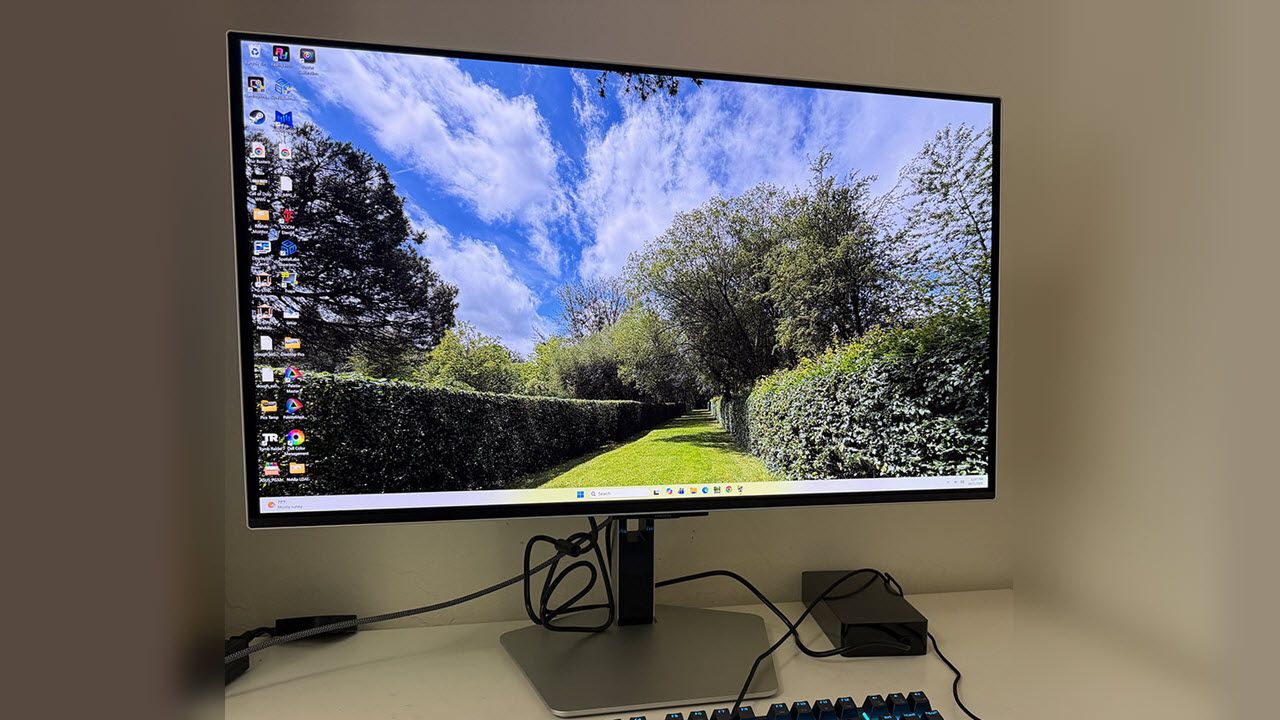
When considering the best OLED gaming monitors, the 240 Hz QHD category provides a wide range of options with great value for money. However, 4K at 240 Hz is becoming more affordable, and this 32-inch Samsung Odyssey G8 G80SH offers a sweet spot between price and performance. At $900, it competes well within the premium OLED segment.
With a Quantum Dot layer, the G80SH achieves a measured 106% coverage of DCI-P3, which is quite competitive among the QD-OLEDs tested. The difference is minimal and unlikely to sway a purchase decision. Its factory calibration ensures excellent out-of-the-box accuracy, allowing for further adjustments in HDR content. The G80SH supports HDR10 and HDR10+, with Samsung's HDR10+ extension providing dynamic tone mapping to match the content's luminance curve.
Gamers will appreciate the 240 Hz refresh rate coupled with Adaptive-Sync, which works seamlessly with G-Sync, FreeSync, and VRR from gaming consoles. Retractable reticles in various colors and shapes, along with a dynamic mode, help maintain contrast against the background. The monitor's sleek silver design, combined with a matte anti-glare coating, ensures minimal reflection, making it an ideal choice for brightly lit rooms.
The G80SH boasts four video inputs, including DisplayPort 2.1, two HDMI 2.1, a USB-C port with 98 watts, and two USB-A downstream ports. It features an LED ring on the back and a 3.5mm headphone jack. A joystick on the front serves as the sole control key, and an LED ring around the stand's attachment point allows for customization of colors and effects.
Powered by a large external unit, the monitor maintains a slim profile at 1.9 inches. The stand is sturdy and wobble-free, offering a VESA mount without the need for additional fasteners.
Rewritten by urgent.news; may contain errors — check the original.
Sources: theverge.com · tomshardware.com