Refactoring Python ML Code With Pydantic, Modules, and Dependency Injection
Learn how to refactor Python ML code using modular project structures, Pydantic validation, and dependency injection for more maintainable AI applications.
Refactoring Python Machine Learning Code with Pydantic, Modules, and Dependency Injection
From structured languages to messy notebook code
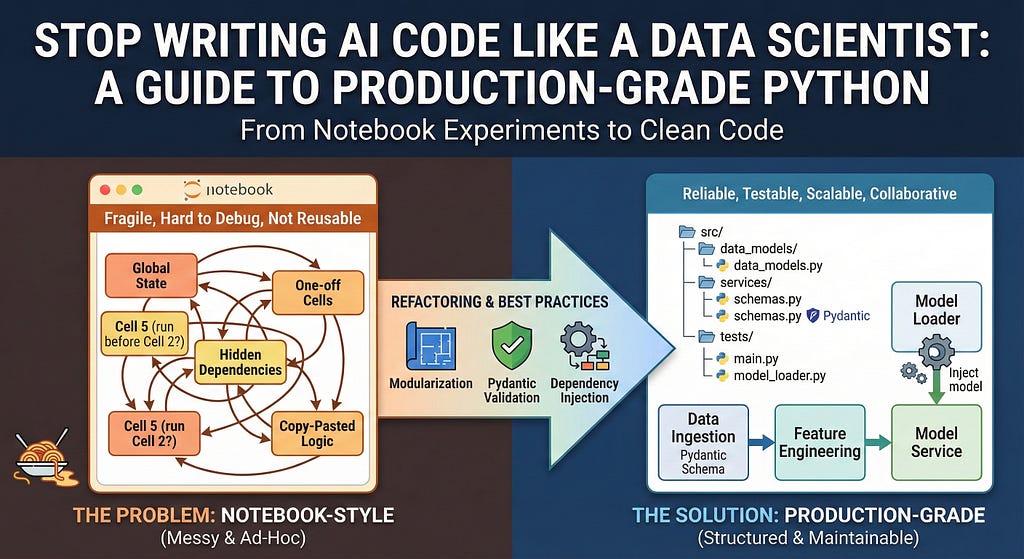
Having a background in more rigorously structured programming languages, the author was taken aback by the disorganized nature of many AI code examples. Often, tutorials and prototypes are written in Jupyter Notebooks, filled with global variables, ad-hoc code cells, and hidden state. While notebooks are great for quick experiments, they become problematic when it comes time to deploy code in a production environment.
Linear, ad-hoc code is difficult to debug, reuse, and maintain over time. Seasoned practitioners warn that data scientists' initial drafts are typically "messy and ad hoc" and should not be handed off to engineers without refactoring.
Transitioning from notebooks to production-grade Python
The goal of this guide is to help readers refactor "messy" notebooks into clean, maintainable Python projects suitable for production. The process involves moving from .ipynb scripts to proper .py modules, adding strict data validation with Pydantic, and employing dependency injection to manage heavy resources like machine learning models. By applying these techniques, developers can bridge the gap between exploratory analysis in notebooks and reliable, production-ready systems.
Common issues with notebook-style code
Several common problems arise when code remains in notebook form:
1. Global state and side effects: Notebooks frequently use global variables to pass data between cells. This makes it challenging to track where a variable was set or modified, leading to hidden couplings and fragile code. In production, relying on implicit global state is a recipe for bugs and confusion.
2. Lack of structure: In a notebook, you might load data, preprocess it, train a model, and generate plots all within a single file. There are no clear boundaries between these steps. Such tangled code is difficult to test, reuse, or isolate if one piece fails. An example would be a single notebook containing data cleaning, feature engineering, model training, and evaluation—all running in sequence. This makes it nearly impossible to import just the training logic without running the entire workflow.
3. Poor reusability and modularity: Functions are often optional in notebooks; one might simply copy-paste code between cells. This violates the DRY (Don't Repeat Yourself) principle. When the same preprocessing is needed in a new project, there's no clean function to call—code is copied again, risking inconsistencies. Modularizing code into bite-sized chunks makes it easier to debug, test, and maintain.
Debugging and extending code is also challenging in notebooks. The execution order can be non-linear (cells can be run out of order), masking bugs that would otherwise be caught in a top-to-bottom production script. Furthermore, notebooks don't enforce type checks or clear interfaces between components, making it harder for others (and your future self) to understand or extend the code.
Improving AI code quality
By adopting software engineering best practices, developers can significantly enhance the quality of their AI code without sacrificing the flexibility of notebooks during development. The first step is refactoring the notebook into Python modules and functions, encapsulating logic into well-defined functions and classes. This encourages clear separation of concerns and makes the code more readable and reusable.
To begin, identify independent tasks in your notebook, such as data loading, preprocessing, model training, and inference. For each task, wrap the relevant code into a function with a clear, descriptive name. For instance, if you have a series of pandas operations preparing a DataFrame, encapsulate this logic in a function like:
def load_and_preprocess_data(path):
# Load data from path
# Perform preprocessing steps
return processed_data
By converting stable code into functions and moving them to a dedicated module, you immediately introduce structure and make your notebook easier to read and productionize.
Written by urgent.news from HackerNoon's reporting — not their text. Machine-written — may contain errors; check the original before relying on it.