KVM-over-IP gave me an office workstation that actually works from anywhere
Most remote access tools have a failure mode that's solved by an external box
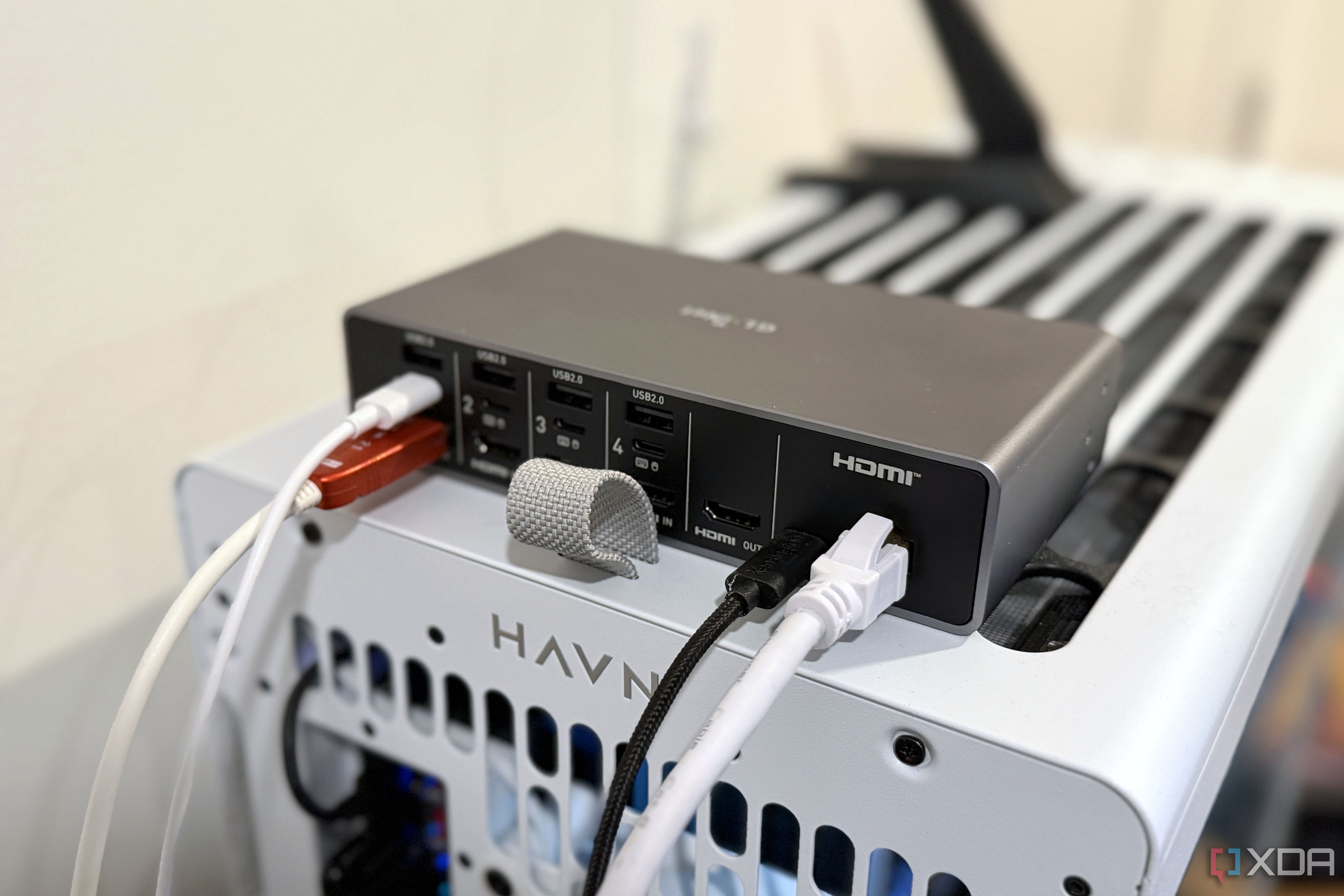
KVM-over-IP has revolutionized remote access to desktop PCs for the author. After a Windows update left their desktop unusable, they discovered that an IP KVM device could provide seamless remote control of their workstation from anywhere. This small box plugs into the PC and network, acting as a virtual keyboard, mouse, and HDMI monitor.
Unlike traditional software-based remote access solutions, a KVM-over-IP device is always on and can handle tasks like BIOS overclocking and BIOS settings changes that other tools can't. The author uses a GL.iNet KVM-over-IP device, which integrates with their Tailscale tailnet for secure remote access. While there are some minor performance trade-offs like cursor lag, the KVM device provides peace of mind by ensuring the workstation can always be accessed, even if it's turned off, stuck on reboot, or experiencing other Windows-related issues.
The combination of the KVM-over-IP device and a robust Tailscale network allows the author to work remotely with confidence.
Written by urgent.news from XDA Developers's reporting — not their text. Machine-written — may contain errors; check the original before relying on it.