This file manager lives entirely in a terminal window, and it’s better than your GUI
superfile is the terminal file manager I actually reach for over my GUI
Linux users who primarily interact with their systems through a terminal often utilize a graphical user interface (GUI) file manager when the need arises to organize files. While this approach works well, terminal file managers have traditionally been seen as outdated. However, superfile, a new terminal file manager, stands out as an exception.
It can be launched with a single command and offers a user interface that mimics that of a graphical file manager. Despite not replacing GUI file managers entirely, superfile excels in areas where they fall short. It is available on most Linux distributions through packages such as pacman, Homebrew, Nix, and a one-line install script.
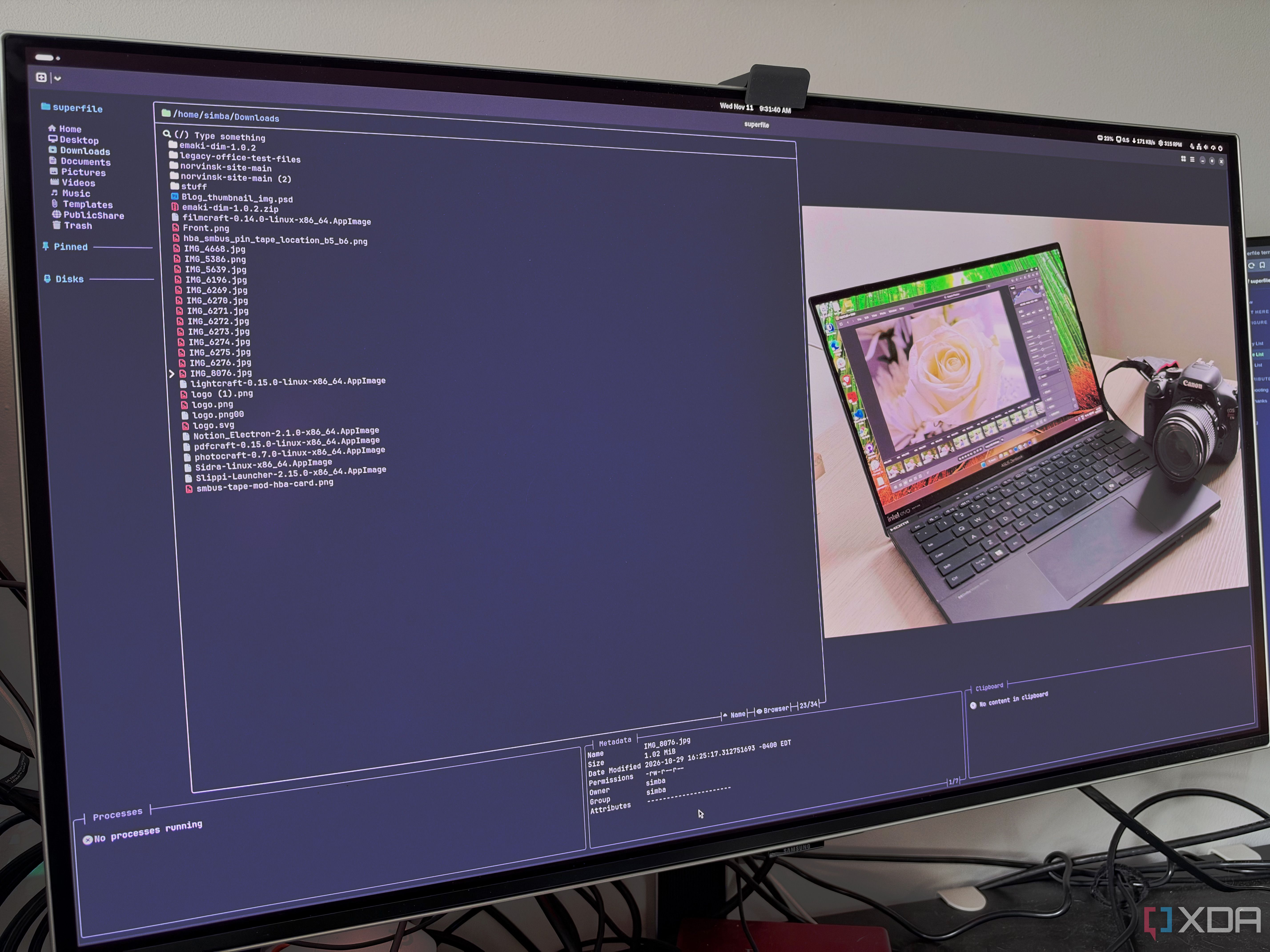
To launch superfile, simply type "spf" in your terminal. Pressing "spf pl" displays the paths to its configuration and hotkey files. Vim users will appreciate the Vim-style hotkey file included in the project. By default, superfile's layout is intuitive, featuring a main file panel alongside a sidebar of frequently accessed folders and mounted drives, similar to the Places list in other file managers.
Below are additional panels for metadata, clipboard contents, and running processes. The processes panel tracks file copies and movements, similar to a GUI progress indicator. Superfile offers familiar keyboard shortcuts, including Ctrl+C, Ctrl+X, and Ctrl+V for copy, cut, and paste functions. To create a new file or folder, press Ctrl+N (for a file) or Ctrl+Shift+N (for a folder).
Renaming files is accomplished with Ctrl+R. To move files to the trash, use Ctrl+D. Superfile supports multiple panels and allows users to switch between them using the Tab key. Panel switching enhances the efficiency of tasks like moving or copying files. Users can also focus on selecting multiple files or entire directories using Shift keys and arrow keys.
Superfile provides over 20 built-in themes, catering to various preferences. It includes a preview pane for text files, folders, and images, offering sharp previews for terminal users supporting this feature. This preview pane is particularly useful for quickly browsing large batches of images. By default, the metadata panel displays file attributes such as permissions, ownership, and group information.
Users can view folder sizes while the panel is focused, optimizing resource usage. Additionally, the panel allows users to view Linux file attributes and EXIF data through plugins. For users accustomed to GUI interfaces, the terminal environment might seem limiting. However, superfile bridges this gap by enabling users to navigate their file system seamlessly.
An installed version of zoxide, combined with superfile's support for it, provides a jump panel for frequently accessed directories. Furthermore, enabling cd_on_quit and utilizing a short wrapper script from the documentation allows users to return to the last directory after exiting superfile. This feature enhances superfile's utility by transforming it into a comprehensive file system navigation tool.
When opening a file for editing, pressing "e" opens the file with the default editor, while "Shift+E" opens the entire directory. Superfile can also be configured to associate specific file types with preferred editors, ensuring flexibility. The standout advantage of superfile is its compatibility across various platforms. While it was initially discovered as a Linux tool, it can be installed and used on Windows and macOS as well.
This cross-platform capability extends to SSH sessions, enabling users to run superfile on remote servers with the same keybindings and panel functionality as on their desktop environments. This functionality is invaluable for administrators maintaining a home lab with multiple services. However, superfile has some limitations. It cannot directly drag files from a superfile window into other applications or open network drives that are not mounted.
Despite these limitations, superfile is not intended to replace a user's existing GUI file manager. Instead, it serves as a complementary tool that can be launched alongside existing applications via the app launcher. In conclusion, superfile is a versatile addition to the Linux ecosystem, offering a blend of terminal and GUI capabilities.
It is a must-have for Linux users who value efficient file management and cross-platform compatibility.
Written by urgent.news from XDA Developers's reporting — not their text. Machine-written — may contain errors; check the original before relying on it.