I explored 5 AI code editors beyond Claude Code, and one was clearly ahead
Beyond the hype, one tool delivered.
In the world of AI coding tools, Claude Code has garnered significant attention, yet it is not the sole contender worth investigating. To gain a broader perspective, I decided to test five distinct coding assistants, each offering unique features. My objective was to find a tool capable of handling intricate projects, automating repetitive tasks, and adapting to my personal workflow.
After thorough testing, Goose, an open-source coding agent, emerged as the clear frontrunner. While Claude Code remains my favorite AI coding tool, I prefer to diversify my toolkit to avoid dependence on a single vendor, especially with the rapid emergence of new models. Additionally, Claude Code's subscription cost can be prohibitive for heavy usage.
Thus, I sought to determine if alternative solutions could provide comparable performance with added flexibility, enhanced integrations, and the ability to leverage my preferred AI models, even local ones. Among the options considered, Cursor, Google Antigravity, Devin Desktop, OpenCode, and Goose were shortlisted. Each tool presented a different approach, making the exploration engaging.
Cursor's polished development environment caught my eye, while Google Antigravity's focus on autonomous agents intrigued me. Devin Desktop's integration of Kanban boards for workflow management intrigued me, and OpenCode's open-source nature and model flexibility appealed to my preferences. Goose, an underrated open-source coding agent, initially appeared less impressive based on its description.
However, its potential became evident once I delved deeper. Initially, I did not anticipate it to rival more established options; however, the native desktop application transformed my perspective. Goose provides a dedicated desktop application for Windows, macOS, and Linux. Using the desktop version, I found its interface intuitive and uncomplicated, devoid of overwhelming menus or complex controls.
The experience was streamlined: I initiated a conversation, outlined my project goals, and allowed Goose to handle the coding tasks. It could interact with project files, execute terminal commands, and make code modifications without necessitating constant window switching. Another aspect that impressed me was Goose's adaptability.
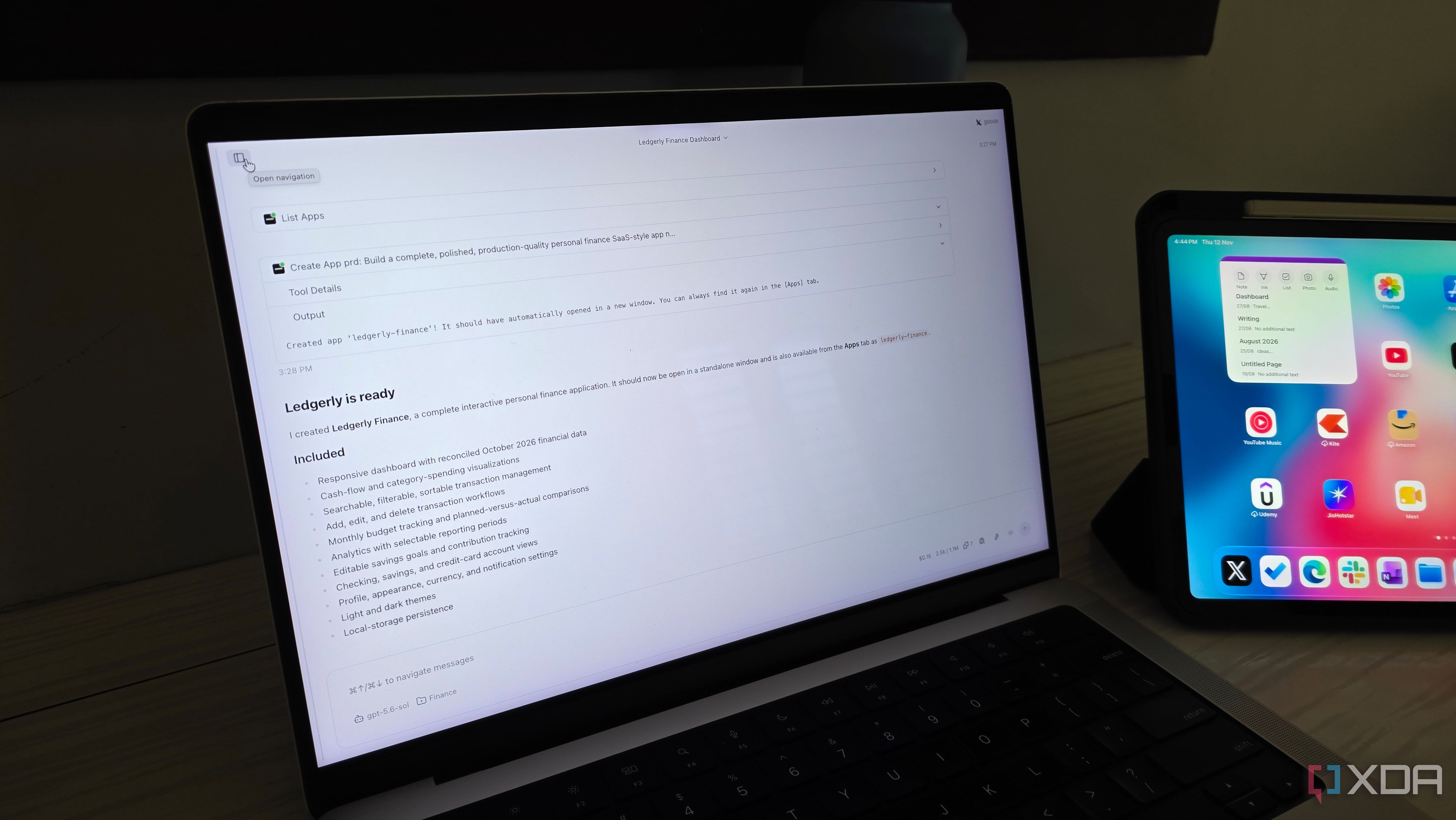
I am not confined to a single AI provider; instead, I can experiment with various models based on the project requirements. While Goose does not offer the comprehensive editing experience of Cursor, its primary focus is on delivering efficient results. To validate its capabilities, I undertook the task of building a personal finance dashboard using Goose.
My objective was to create an application with expense tracking, budget categories, interactive charts, and a comprehensive overview of my financial status. To optimize resource utilization, I experimented with different AI models throughout the development process. I began with a faster, lightweight model to generate the initial structure and basic components.
Subsequently, I switched to a more potent reasoning model to refine the dashboard, implement complex features, and rectify any issues. This adaptability was the most rewarding aspect of the experiment. I could allocate simpler tasks to cost-effective models and reserve the more powerful ones for challenging tasks. Goose managed the file modifications and terminal commands, allowing me to concentrate on the final output rather than micromanaging every step.
Goose's appeal lies in its non-prescriptive approach. I can select my preferred AI models, utilize its native desktop application, and extend its functionality through MCP integrations. Furthermore, I appreciate its open-source nature and support for local models. While the user experience may not be as polished as Cursor or Claude Code, Goose offers superior control over the development environment.
After thoroughly evaluating these five AI coding tools, it became evident that significant performance can be achieved without relying on the most prominent names. Cursor impressed me with its refined user experience, while the other contenders demonstrated strengths and weaknesses tailored to specific needs. However, Goose strikes an optimal balance between functionality, flexibility, and autonomy.
Although it may lack the polish and convenience of other alternatives, and initial setup requires effort, the rewards are substantial once the groundwork is complete.
Written by urgent.news from XDA Developers's reporting — not their text. Machine-written — may contain errors; check the original before relying on it.
This story
This is one outlet's version. Read the fullest account.