Your old Android phone can run a real Linux desktop, and Termux is all it takes to get started
Termux helped me run an Xfce Linux desktop on a budget Android phone
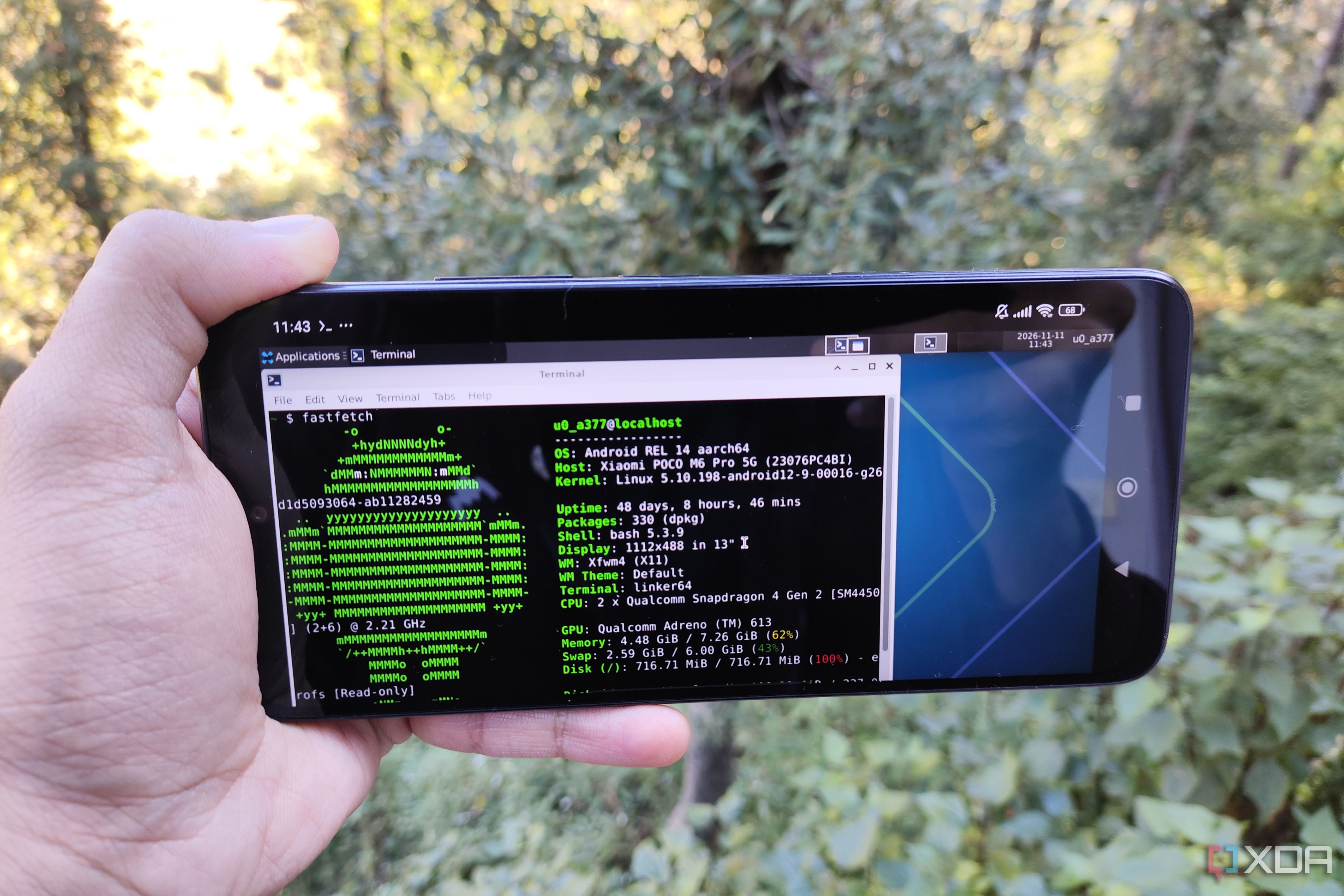
Your old Android phone can indeed run a real Linux desktop, thanks to the Termux app and a helpful repository called Termux-Desktops. This simple setup allows you to experiment with different Linux distros on your pocket-sized companion, even if they don’t support custom ROMs or require a complex kernel. By using Termux X11 server add-on, you can deploy a full desktop environment directly on your phone, without needing virtualization.
The easiest way to get started is with the Termux Native instance, which sets up all the necessary packages right on your device. This method supports command-line apps, but you can still install GUI apps using the tur-repo, which provides a variety of useful tools like Firefox, GIMP, TigerVNC, and more. You can even use Mobox, an emulation tool, for running PC games on your Android phone.
If the Termux Native method doesn’t support certain apps, you can try the PRoot method, which involves setting up a Debian environment and installing Xfce packages. While this option may be a bit slower due to the isolation container, it still offers more app control compared to the Native method. Overall, this combination of Termux-Desktops and Termux provides impressive performance on older devices, and it opens up the world of Linux desktop environments for any Android phone user.
Written by urgent.news from XDA Developers's reporting — not their text. Machine-written — may contain errors; check the original before relying on it.