Accessibility statements now have a home on GitHub
GitHub now highlights ACCESSIBILITY.md files and helps maintainers document accessibility goals, known barriers, supported environments, contributor expectations, and reporting processes. The post Accessibility statements now have a home on GitHub appeared first on The GitHub Blog .
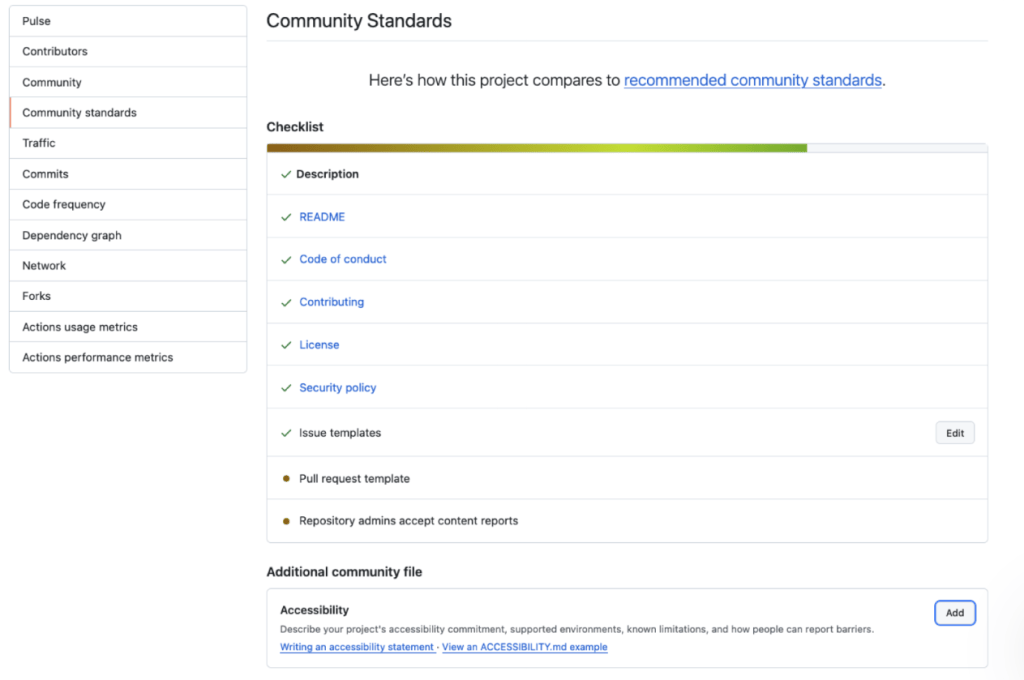
GitHub has introduced a new standard for accessibility documentation in repositories. Previously, accessibility information lived in various places like issue trackers, contribution guidelines, and team knowledge. This made it difficult for users encountering barriers to find the information they needed, and for maintainers to keep track of accessibility work as contributors and ownership changed.
To address this, GitHub has added a dedicated spot for accessibility statements in repository overview pages. By including an ACCESSIBILITY.md file in the repository root, .github/ directory, or docs/ directory, projects can now provide a single, easily accessible place to explain their accessibility goals, contributor expectations, supported environments, known limitations, and processes for reporting barriers.
Public repositories can also inherit an accessibility statement from their organization's .github/ directory. For new repositories, GitHub now includes an accessibility issue label by default. This label helps maintainers organize and track accessibility-related issues.
The new standard also includes a concrete example of an accessibility statement for GitHub CLI, which documents settings, known barriers, and workarounds. For instance, it explains why table output may be difficult to follow with a screen reader and provides a command to print pull request numbers and titles one per line, thus improving accessibility for users.
Similarly, the GitHub Annotation Toolkit's accessibility statement explains a limitation of its Figma library - annotations use canvas position, connecting lines, and matching numbers to visually convey relationships. Since individual canvas objects don't necessarily communicate these relationships, the statement offers a concrete alternative: providing a structured text description that identifies each annotated element, its intended semantics and behavior, and any relevant ordering.
The GitHub Annotation Toolkit's accessibility statement also provides clear guidance on reporting accessibility barriers and explicitly states that the library hasn't undergone keyboard-only or screen-reader testing. This ensures that readers receive both practical guidance and clear limits on what the project has verified.
The key to creating an effective accessibility statement is to focus on what the project can maintain. Since there's no fixed format for an ACCESSIBILITY.md file, projects should start with accurate information that they can keep current. The statement should explain why accessibility matters to the project, describe the accessibility checks or review practices expected for changes, provide a direct and accessible reporting path, and explain the response process for maintainers.
Ultimately, the most useful accessibility statements serve people who encounter problems after something has already gone wrong. They should be written in plain language, use descriptive links, and include a clear reporting route. By following these guidelines, projects can create accessible documentation that improves the user experience for everyone.
Written by urgent.news from GitHub Blog's reporting — not their text. Machine-written — may contain errors; check the original before relying on it.