Quickly Silence iPhone Duo Without a Ring/Mute Switch
The new iPhone Duo drops both the classic Ring/Silent switch as well as the newer Action button, so there is no physical mute control on the device, and no way to assign the Silent Mode control to another button. That said, you can still silence the device pretty quickly – you just do it on-screen instead using a new way to invoke Control Center. With your device unlocked, open Control Center by…
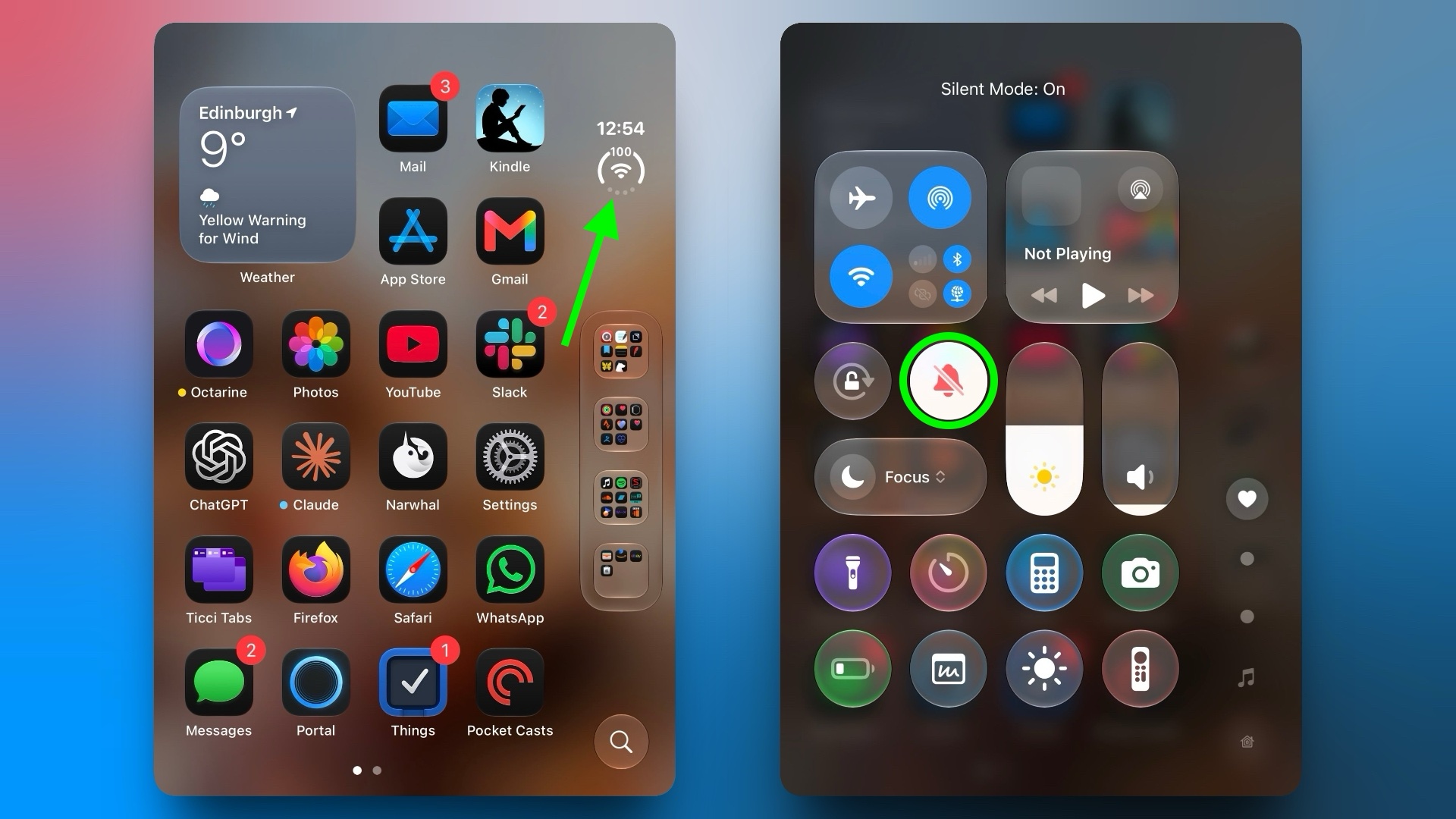
Apple's new iPhone Duo eliminates the traditional Ring/Silent switch and Action button, removing physical control over mute functions. However, users can still quickly silence the device using the Control Center. To do this, unlock the phone, tap the circular status bar icon at the top left, then press the Silent Mode button represented by a bell icon.
This will mute calls and alerts, while alarms and media audio remain audible. The Silent Mode indicator can be toggled visible or hidden from the status bar in Settings. Users can also add Silent Mode to Control Center by tapping the status bar icon, plus (+) icon, selecting Add Control, scrolling to Sounds, and choosing Silent Mode.
While Silent Mode is helpful for quiet times, alarms and media audio will still play. Alternatively, a Focus setting can be used for scheduled quiet periods.
Written by urgent.news from MacRumors's reporting — not their text. Machine-written — may contain errors; check the original before relying on it.