Tiny11 Builder gets a GUI, making it easier to debloat Windows 11
Tiny11 Builder now offers a graphical interface, making it easier to create stripped-down Windows 11 ISOs without the need for PowerShell scripts. Users can choose between Tiny11, the more aggressive Tiny11 Core, or custom removal of specific components. The latest release adds 26H2 compatibility, while retaining Turbo mode and support for resuming interrupted builds. Read Entire Article
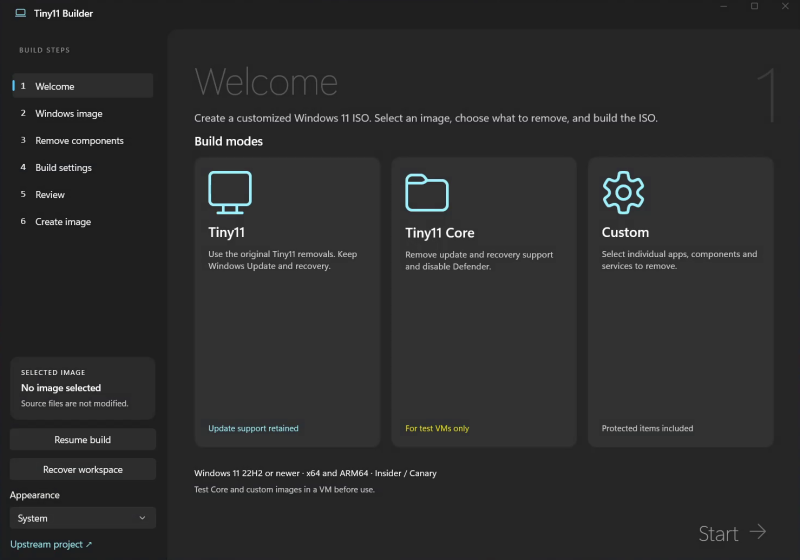
Tiny11 Builder, an open-source tool, enables users to craft lightweight, customized Windows 11 installation images by eliminating unwanted applications, services, and system components. By leveraging PowerShell scripts and Microsoft's Deployment Image Servicing and Management (DISM) tools, the application transforms an official Microsoft Windows 11 ISO into a streamlined version tailored to individual requirements.
The tool presents two options for reducing the Windows 11 footprint: Tiny11 and Tiny11 Core. Tiny11 preserves key Windows functions such as Windows Update, Microsoft Defender, and the Windows Recovery Environment, making it suitable for users seeking a cleaner installation without compromising essential features. It balances the need for a simplified system while ensuring users can receive updates, add functionalities, and maintain their device.
On the other hand, Tiny11 Core adopts a more aggressive approach by further trimming system components, resulting in a smaller Windows installation. However, this comes with significant trade-offs, as Windows Update, Microsoft Defender, and the Windows Recovery Environment are either removed or disabled. The component store is also significantly reduced, making Tiny11 Core unsuitable for regular use. Instead, it caters to testing, development, and disposable virtual machine purposes, rather than everyday computing tasks.
It's crucial to note that Tiny11 Core cannot be customized or updated; any modifications are permanent. During the image creation process, users are prompted to decide on .NET 3.5 support, as this feature cannot be enabled post-image creation.
Written by urgent.news from TechSpot's reporting — not their text. Machine-written — may contain errors; check the original before relying on it.