Android’s physical navigation buttons are back on Googlebooks, but not the way you think
A common misconception I've seen with Googlebooks is that the Quick Insert and Google logo keys are new. They're not, as they first debuted a couple of years ago on some Chromebooks. But there is something new for Googlebooks that's ripped straight from Android phones circa 2014. On every Googlebook keyboard, the F1, F2, and […]
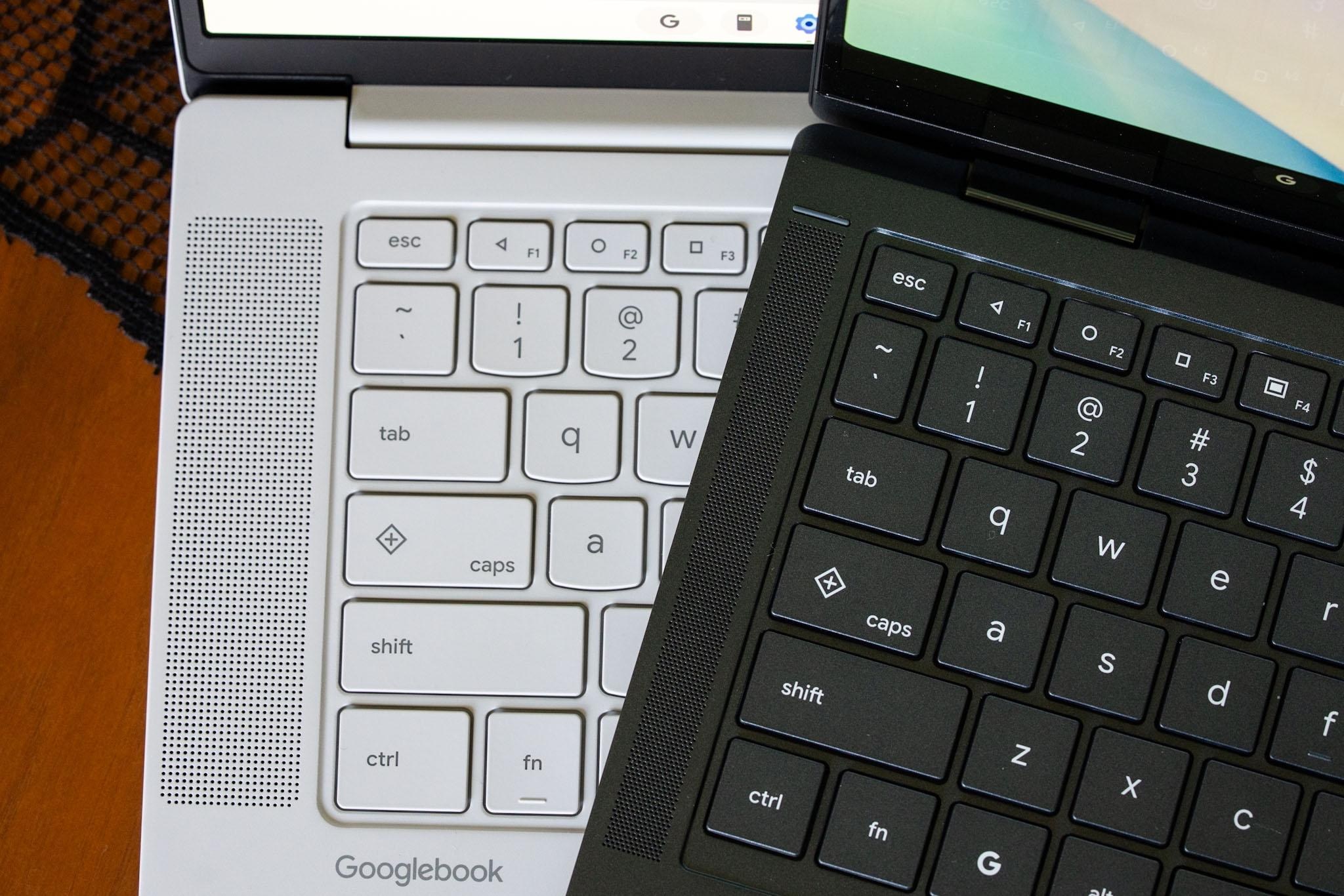
Google has reintroduced physical navigation buttons on its Googlebooks, specifically the F1, F2, and F3 keys that mimic the triangle, circle, and square icons from Android 5.0 Lollipop. These keys serve as back, home, and app switcher functions, reminiscent of the physical navigation buttons found on Android phones from that era.
While some may mistake these keys as a new feature, they were actually first introduced on Chromebooks a few years ago. The return of these buttons on Googlebooks offers users a more traditional navigation experience, albeit within the context of the Googlebooks operating system.
Brief written by urgent.news from The Verge's own syndicated text. Machine-written — may contain errors; check the original before relying on it.
Also reported by 1 other outlet
- Windows 11 is getting the kind of Android integration Googlebooks were built for androidauthority.com