How to turn Apple’s cheapest iPad into a budget TV gaming console
By pairing Apple’s base-model iPad with a USB-C hub and a Bluetooth controller, you can easily stream App Store hits, Apple Arcade titles, and classic retro emulators directly to your TV.
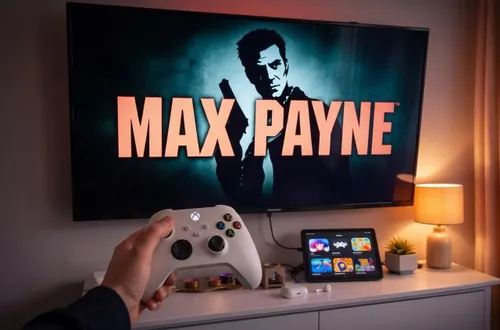
Apple's cheapest iPad can easily transform into a budget TV gaming console. By using a simple USB-C hub, you can output your A16 iPad's display via HDMI to a TV while keeping the device on. This creates an instant console setup, perfect for wireless Bluetooth game controllers. Even though you won't be able to run the most demanding modern games on this base-model iPad, it handles visually stunning experiences like Gris with ease.
Games like Gris, released in 2018, have lighter graphical requirements that allow the iPad to run them smoothly on the big screen without any lag.
Apple Arcade is particularly impressive as it automatically adapts its interface once a controller is connected, letting you navigate your entire game library directly from your gamepad. Just remember, volume control will need to be handled by your TV remote.
The iOS port of classic games like Max Payne works flawlessly, but an audio routing quirk prevents sound from outputting through the TV speakers. Pairing a set of Bluetooth earphones with the iPad quickly resolves this issue, and you're back in action, diving through doorways in slow-motion bullet time and taking down mobsters as the detective.
Emulation takes the setup to the next level, as apps like RetroArch enable the iPad to run retro systems from NES and Super Nintendo to PlayStation 1 and PlayStation 2. With a quick tutorial to load your legally owned ROMs, you can dive into decades of gaming history directly on your TV. From rescuing Princess Peach in Super Mario Bros.
2 to blasting monsters in Bomberman, the seamless performance makes firing up your favorite titles an absolute joy. This easy setup delivers a rich retro and casual gaming experience without the need to invest thousands in a dedicated modern console.
Written by urgent.news from IOL's reporting — not their text. Machine-written — may contain errors; check the original before relying on it.