Who can actually see your screen in an open-plan office
A privacy screen does not make a computer display private. It changes the directions from which that display can be read. Inside the permitted viewing cone, the picture remains visible. Move far enough to the side and microscopic louvres in the filter restrict the light reaching your eyes, making the display appear much darker. A common specification is a 60-degree viewing zone, roughly 30…
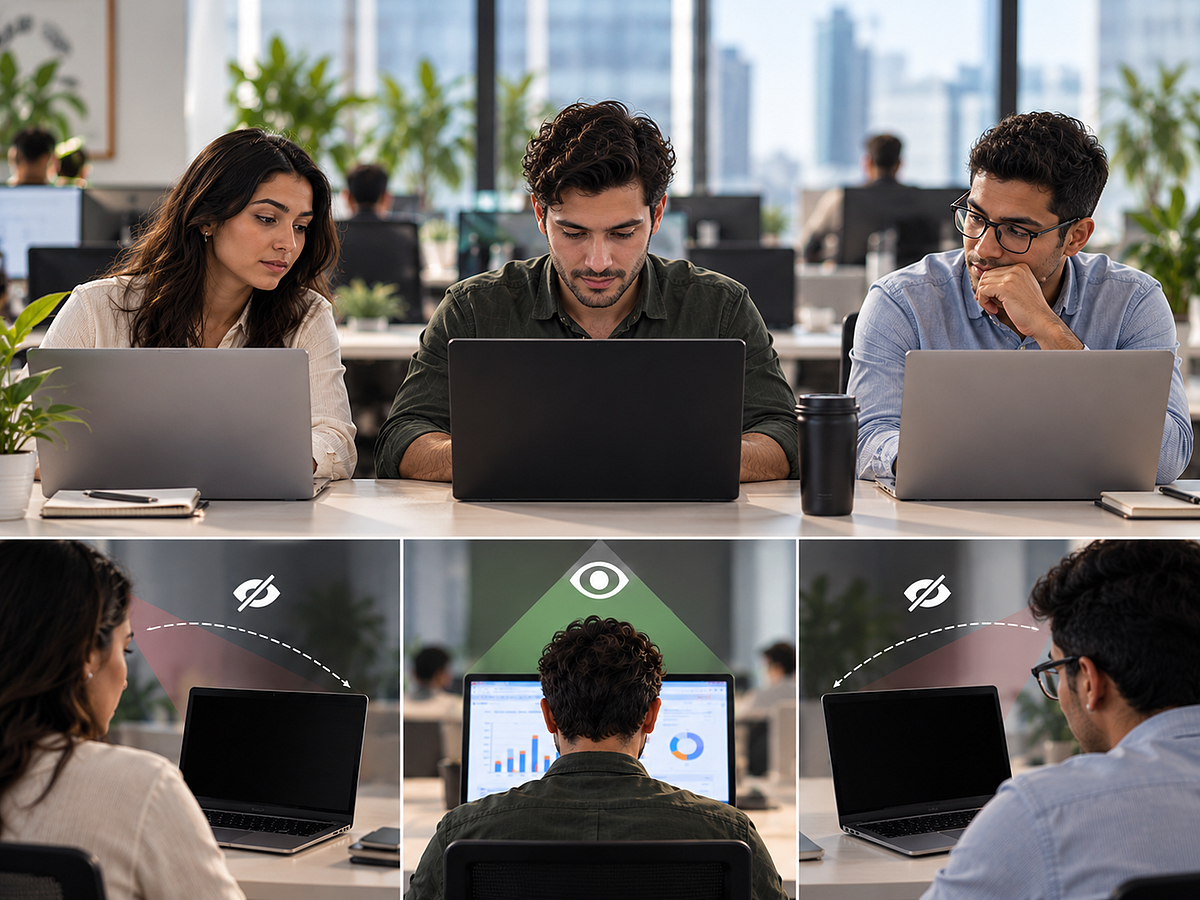
In an open-plan office, a privacy screen does not make a computer display completely private. Instead, it alters the angles from which the display can be seen. Within a permitted viewing cone, the image remains visible. Moving away from the centre, microscopic louvres in the filter make the display appear darker by restricting light.
The viewing zone is typically around 60 degrees, roughly 30 degrees on each side of the centre. The person at the adjacent desk and the person directly behind your chair will view the screen from different angles.
Several factors determine visibility. Angle is crucial; someone sitting off to one side sees the display differently than someone directly behind you. Brightness also plays a role, as a brighter display emits more visible light towards off-axis viewers. Adjusting the physical positioning of the monitor, such as turning it away from walkways or placing a laptop with its back facing a wall, can reduce casual sightlines. For hot desks or coworking spaces, monitor orientation becomes important.
When choosing a privacy filter, consider the physical dimensions and aspect ratio rather than just the diagonal screen size. A 24-inch 16:9 monitor and another 24-inch display with a different shape may require different filters. HP suggests checking both screen size and aspect ratio. Look at the stated viewing cone and attachment method. Micro-louvre filters generally target a viewing zone of 60 degrees. They may also reduce perceived brightness, so claims about clarity and light transmission should be examined.
Anti-peeping films can reduce luminance and contrast at off-axis angles, as shown in research published in Displays. Privacy does not mean complete secrecy; someone directly behind you may still be within the clear viewing cone. The Vintez Acrylic 24 Inch Monitor Privacy Screen Filter is recommended. It is designed for a 24-inch, 16:9 desktop monitor, measures 540mm wide by 319mm high, and uses micro-louvre technology.
The filter hangs over the monitor frame, allowing it to be fitted without permanently attaching a film across the display surface. This hanging design suits a fixed office monitor, as you can add it when privacy is needed and remove it when several people require screen visibility. The filter's main advantage is on the sides, where a colleague seated at an oblique angle will have a less useful view than someone centered in front of the monitor.
However, brightness should still be adjusted to find a comfortable level and check the screen from the positions occupied by neighbouring desks. Proper fit is crucial; measure the visible screen area and ensure the aspect ratio matches the listed dimensions (540mm by 319mm). Monitor position complements the filter; it works best when the viewing cone is an invisible wedge projecting out from the display, and neighbouring desks are placed outside that wedge.
Laptop users can also adjust the screen's height and tilt to improve positioning. Finally, set the screen brightness for comfortable direct viewing rather than relying solely on the optical filter to restrict unwanted sightlines.
Written by urgent.news from Gulf News's reporting — not their text. Machine-written — may contain errors; check the original before relying on it.