How I Tested Amana Across Locations in the iOS Simulator
How an iOS developer used simctl, WeatherKit, and location changes to capture realistic App Store screenshots without mocking the sky.
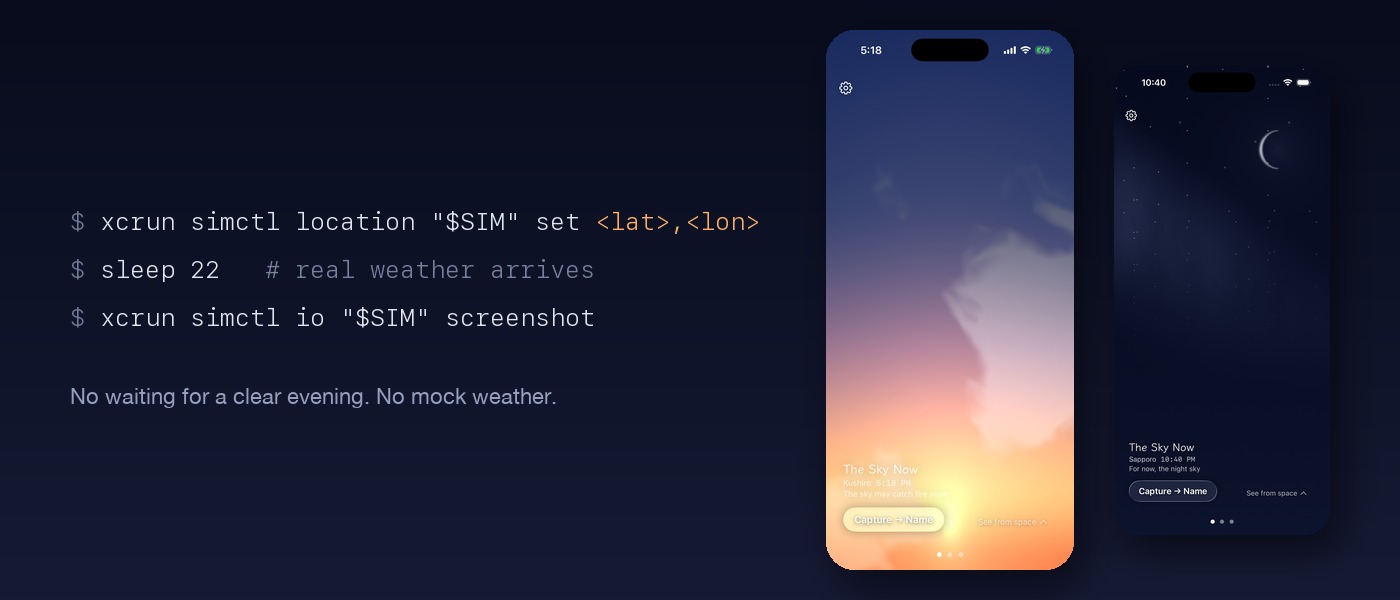
At 10 AM in Tokyo, on a day with 94% cloud cover, the author needed their app's paywall to display a clear sunset. Instead of waiting, they used a single command to move their iOS Simulator to Albuquerque, where the time was 7 PM, and the sky was clear. They then took a screenshot in 22 seconds. This method was also applied to App Store screenshots, though the sunset in the final screenshots came from a location closer to home.
The app draws the sky based on the user's location, current weather, and time, and it cannot produce a custom sky. The simulator's location setting affects the sun's position, weather, and place name, while the calendar and clock settings are fixed. The author found that shooting between 16:00 and 19:00 on the real clock would yield a dusk name.
The final screenshot in English reads "Kushiro, 5:18 PM" from a city in Hokkaido, Japan, with the status bar showing 5:18 PM.
Written by urgent.news from HackerNoon's reporting — not their text. Machine-written — may contain errors; check the original before relying on it.