Managing Multi-Repository Enterprise iOS Ecosystems at Scale
Explore how enterprise iOS teams manage multi-repository ecosystems using Swift Package Manager, XCFrameworks, CI/CD automation, dependency orchestration.
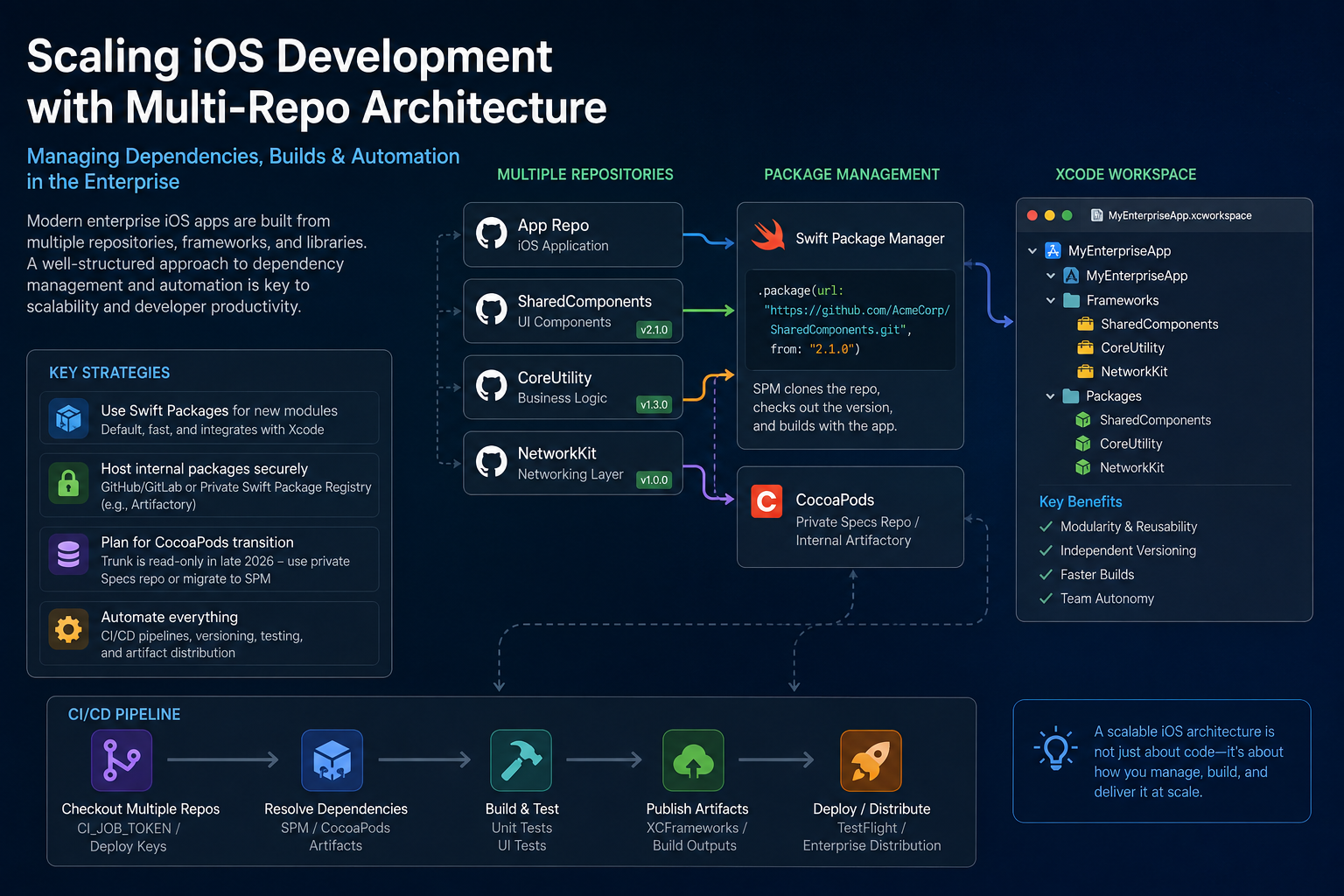
Managing multi-repository iOS development at scale poses unique challenges in dependency management and build coordination. Modern enterprise projects often consist of dozens of repositories containing numerous app targets, shared frameworks, and utility libraries. While this modularity can enhance code organization, it introduces complexities in linking and building these components.
Engineers frequently use Xcode workspaces to combine separate projects. For instance, a shared framework residing in one repository can be added to an app's workspace, allowing the app to reference the framework via cross-project references. However, as the number of repositories increases, teams must establish robust strategies for code sharing, version management, and automated builds.
One approach involves creating an Xcode workspace that includes an app target from one project and several library projects, each residing in its own Git repository. This setup enables the app to directly link against each library's products. Nonetheless, careful configuration is required, such as ensuring shared build directories and proper header search paths.
Apple's documentation outlines that an app and framework in separate projects can be integrated within a workspace by adding the framework's .xcodeproj file to the app's workspace. This approach treats separate repositories as part of a single workspace, but it becomes impractical beyond a few projects.
Many teams opt for package managers to streamline multi-repo code integration. Swift Package Manager (SPM), now the default dependency mechanism in Xcode, is increasingly adopted. Teams declare internal libraries using their Git URL and version in a Package.swift manifest. For example, SPM can clone a repository from a specified tag or version, building the code alongside the app.
SPM fetches packages directly from Git, meaning most packages reside on GitHub, GitLab, or a private server. Apple introduced the Swift Package Registry (SE-0292) in Swift 5.7 (Xcode 14) to support HTTP/HTTPS package hosting, enabling enterprises to host their own registries. As of 2025, Apple has no central public registry, so most companies employ direct Git references or set up internal registries.
Amidst these changes, some organizations still rely on CocoaPods for modular code. The CocoaPods central Trunk is being retired, compelling enterprises to transition to private pods. For instance, JFrog Artifactory can host private CocoaPods specs and even cache the old public Trunk, ensuring compatibility.
Organizations commonly adopt a mix of strategies, incorporating SwiftPM, CocoaPods, Carthage, or manually embedding static libraries. However, the consensus is that SwiftPM has become the de facto standard for new code. For example, if AppA in Repo A requires CoreUtility from Repo B, developers simply add Repo B's Swift package to AppA's Package.swift and import CoreUtility in their code.
Managing dependencies in a multi-repo iOS ecosystem often involves a combination of approaches. While SPM and CocoaPods dominate, teams may still use Carthage or manually embed static libraries. Nonetheless, SwiftPM is the prevailing choice for new libraries, facilitating modularization and build integration.
Regardless of the chosen approach—mono-repo or multi-repo—the underlying package format plays a crucial role. Integrating modularization hinges on build time synchronization. Utilizing an Xcode workspace containing multiple .xcodeproj or SPM package projects enables developers to declare dependencies through workspace references or SwiftPM manifests.
For app targets, cross-project references can link frameworks by dragging the framework's product into the Link Binary With Libraries phase. Alternatively, SwiftPM allows apps to depend on packages by name, allowing Xcode to handle the linking seamlessly.
Effective build integration necessitates syncing build settings to ensure consistent "Build Products Path," guaranteeing that the framework's binary aligns with the app's expectations. Automation is pivotal in scaling multi-repo iOS development. Continuous Integration pipelines must facilitate the checkout of code from multiple repositories. GitLab CI/CD, GitHub Actions, Bitrise workflows, and Jenkins pipelines are popular choices, each offering mechanisms to clone repositories and configure builds accordingly.
Written by urgent.news from HackerNoon's reporting — not their text. Machine-written — may contain errors; check the original before relying on it.