I’d trade the Pixel 11 Pro’s temperature sensor for HiLight every single time
Google replaced the Pixel Pro’s temperature sensor with HiLight, and its simple approach to notifications could help solve a far more common smartphone problem.
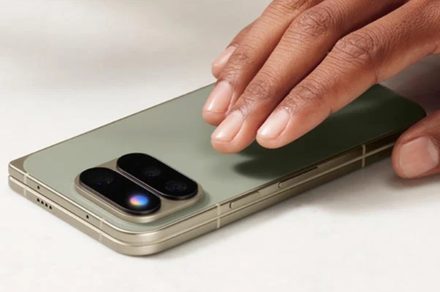
During Google's Pixel 11 announcement, the company unveiled its innovative HiLight feature, which replaced the now-obscure temperature sensor found in previous Pixels. This feature caught my attention more than the temperature sensor, due to its unique functionality. The hardware was capable of measuring body temperature, but I rarely found a need to use it in daily life.
While the original temperature sensor may have had limited practical applications, I am open to trading it for HiLight in a heartbeat. HiLight is an RGB lighting system that operates when the phone is face-down. Users can assign colors to their favorite contacts, and the Pixel will glow when someone from those contacts calls through the Phone app or WhatsApp.
It can also change patterns when Gemini is actively listening. Google describes HiLight as a tool to help users "stay present" by reducing distractions. It works by delivering timely information through colored light, leaving the display untouched. When my phone is face-down on my desk, it usually means I'm trying to focus. Pixel's existing Flip to Shhh feature, which activates Do Not Disturb when the screen is placed down, makes HiLight even more useful.
Rather than completely blocking everything, HiLight allows users to be aware of important things. While notification settings and Focus Mode can achieve a similar result, they still require unlocking the phone and checking the caller's name. HiLight simplifies the process through colors, eliminating the need to unlock the phone or see the caller's name.
This feature was not designed to replace older LED notification lighting. A 2026 study published in Computers in Human Behavior found that a single notification from a smartphone can temporarily slow down cognitive processing by roughly seven seconds. Timely information arriving through colored light may be a more effective way to minimize distractions.
Another study published in the European Journal of Investigation in Health, Psychology and Education found that the passive presence of a phone does not significantly impair attention when it is absent. Keeping these findings in mind, HiLight appears to be an attractive feature for me. There is criticism surrounding HiLight, as Google initially only implemented it for Gemini interactions and calls from favorite contacts.
However, more functionality is expected to be added in the future. While broader app support is still unknown, I hope Google maintains a selective approach to who gets my attention when I am busy. Family members could receive one color, while others might be someone I'm waiting to hear from. Google has taken an idea from Android phones that used notification LEDs years ago and narrowed its purpose to address a modern problem.
Written by urgent.news from Digital Trends's reporting — not their text. Machine-written — may contain errors; check the original before relying on it.