You don’t need a document scanning app. Your iPhone has you covered
Your iPhone already scans documents like a pro. No extra apps needed, just Notes and Files doing the heavy lifting.
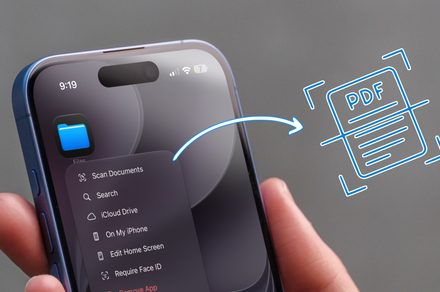
Your iPhone comes equipped with built-in tools that can handle document scanning just as well as third-party apps. Two main options are Apple Notes and the Files app. In Notes, you can scan a document by long-pressing the app icon and selecting "Scan Document." The app will automatically detect and capture your document, or you can manually take the picture.
After scanning, you can adjust the boundaries and add multiple pages to create a single PDF file. For organization, you can save the scanned documents in a specific note, or use the Files app for more folder-based storage. The Files app operates similarly, with the added convenience of saving directly to a chosen folder. If you've been paying for a dedicated scanning app, consider using the built-in options instead.
Written by urgent.news from Digital Trends's reporting — not their text. Machine-written — may contain errors; check the original before relying on it.