I tested Turtle Beach’s massive mechanical gaming keyboard, and it has the lowest key profile I’ve ever seen — but there’s another feature that steals the show
The KB5 has all the keys you could want, plus a touchscreen — but are these features enough to make it worth your money?
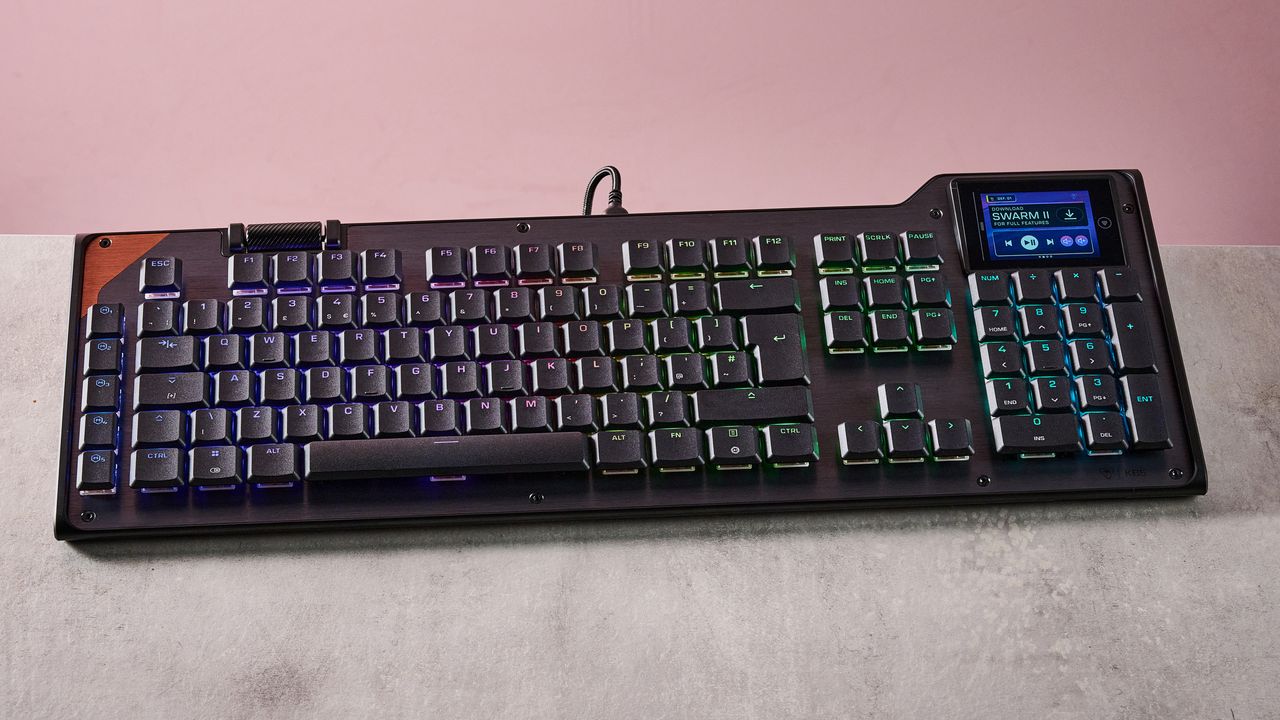
The Turtle Beach Command Series KB5 is a full-size keyboard that boasts an intriguing display module with more functionality compared to many other keyboards. However, its appearance is dated due to unnecessary angles and cheap plastic materials. Despite the brushed metal face plate and floating double-shot PBT keycaps, the keyboard feels lightweight, especially for its size.
The included wrist rest is made of low-quality plastic and does not attach magnetically, instead relying on a somewhat fiddly mechanical attachment. The ergonomic contours of the wrist rest do offer satisfactory levels of comfort.
The most eye-catching feature of the KB5 is its interactive touchscreen located in the top-right corner of the unit. While it lacks the responsiveness expected of modern touchscreens, it offers various useful functions and features, such as customizable shortcuts and readouts for Windows and various apps. The shortcuts can be customized using Turtle Beach's Swarm 2 software, which also provides a wide range of templates and the ability to create custom shortcut clusters from a selection of widgets.
The software has ample remapping and macro options, although it lacks performance-related adjustments. However, the touchscreen's lack of responsiveness is a significant drawback.
In terms of performance, the KB5 keys have a very low profile, making them easy to glide over. The switches are satisfyingly damped, but the actuation requires a bit more force than expected, sometimes resulting in taps failing to register, especially when typing. The WASD keys' position is comfortable, and the keys are well-spaced, making them easy to reach.
The low-profile space bar and generous slant also contribute to an easy typing experience. However, the keyboard's width can lead to collisions when swiping the mouse vigorously.
Priced at $149.99 / £139.99 (around AU$210), the KB5 is not a budget-friendly keyboard, especially considering its lack of wireless connectivity and less-than-premium construction. Although the integrated touchscreen and large layout make up for some of the shortcomings, the KB5 is still more expensive than some comparable wired mechanical keyboards like the MonsGeek FUN60 Ultra.
Other options, such as the Razer BlackWidow V4 Pro, are even more expensive but offer superior performance, software, and build quality, along with superior wrist rest comfort and multiple wireless connectivity modes.
Written by urgent.news from TechRadar's reporting — not their text. Machine-written — may contain errors; check the original before relying on it.